


Windows 10 reached EOS (end of support) on October 14, 2025. If you are on Windows 10, see this article.

Kërkoni te Asistenca

Shmangni karremëzime gjoja asistence. S’do t’ju kërkojmë kurrë të bëni një thirrje apo të dërgoni tekst te një numër telefoni, apo të na jepni të dhëna personale. Ju lutemi, raportoni veprimtari të dyshimtë duke përdorur mundësinë “Raportoni Abuzim”.

Mësoni Më Tepër
Arkivuar

Calendar error after Lightning update

YReginster replied
Hillbilly

TB 54.1.1 on Linux after last update (22 May 17?) An error was encountered preparing the calendar located at googleapi://xxxx@gmail.com/?calendar=yyyygmail.com for use. It will not be available. [Exception... "Component returned failure code: 0x80570015 (NS_ERROR_XPC_CI_RETURNED_FAILURE) [nsIJSCID.createInstance]" nsresult: "0x80570015 (NS_ERROR_XPC_CI_RETURNED_FAILURE)" location: "JS frame :: resource://calendar/modules/calUtils.jsm -> file:///zzzz.default/extensions/%7Be2fda1a4-762b-4020-b5ad-a41df1933103%7D/calendar-js/calCalendarManager.js :: calCalendarManager.prototype.createCalendar :: line 446" data: no] Any ideas?

TB 54.1.1 on Linux after last update (22 May 17?) An error was encountered preparing the calendar located at googleapi://xxxx@gmail.com/?calendar=yyyygmail.com for use. It will not be available. [Exception... "Component returned failure code: 0x80570015 (NS_ERROR_XPC_CI_RETURNED_FAILURE) [nsIJSCID.createInstance]" nsresult: "0x80570015 (NS_ERROR_XPC_CI_RETURNED_FAILURE)" location: "JS frame :: resource://calendar/modules/calUtils.jsm -> file:///zzzz.default/extensions/%7Be2fda1a4-762b-4020-b5ad-a41df1933103%7D/calendar-js/calCalendarManager.js :: calCalendarManager.prototype.createCalendar :: line 446" data: no] Any ideas?

Krejt Përgjigjet (4)

Edit Lightning 5.4 update 24 May 17

I have the problem too.
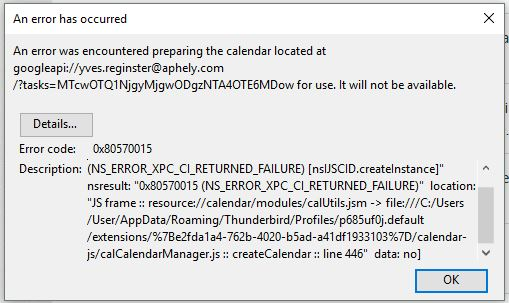
I did solve it but I cannot be sure how. I think it was as simple as updating gContactSync in Extensions.

I simply went back to previous version of Thunderbird. de-install Thunderbird, re-install and install again Provider for Google Calendar.

My issue is now solved.