

Kjo rrjedhë është arkivuar.
Ju lutemi, bëni një pyetje të re, nëse keni nevojë për ndihmë.

Arkivuar
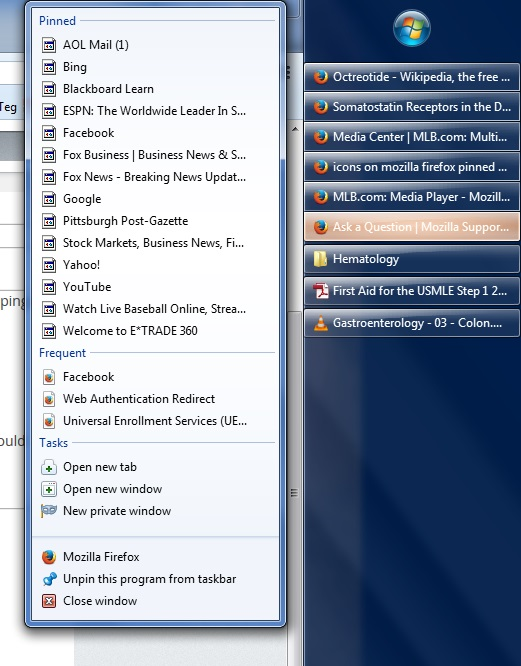
Icons for taskbar quick launch pinned web pages do not appear.

I have Firefox pinned to my taskbar. When I right-click this taskbar icon, it pulls up a menu containing the following website groupings:
  * Pinned
  * Frequent
  * Tasks
  * <Unlabeled>; contains "Mozilla Firefox," "Unpin...," & "Close window"
The icons that should identify the Pinned & Frequent websites have been corrupted & default to the Windows generic icons. I would really like to get this long-time annoying problem fixed. See below image...
I have Firefox pinned to my taskbar. When I right-click this taskbar icon, it pulls up a menu containing the following website groupings:
* Pinned
* Frequent
* Tasks
* <Unlabeled>; contains "Mozilla Firefox," "Unpin...," & "Close window"
The icons that should identify the Pinned & Frequent websites have been corrupted & default to the Windows generic icons. I would really like to get this long-time annoying problem fixed. See below image...
Krejt Përgjigjet (1)
HI Mike, This is something that is managed by the operating system. Perhaps there is a temp file that controls these ico pictures, or is there a way to add a new url to this list to see if there is a work around by adding a new one.