Trying to install lightening. Box tells me I am trying to open a file and what should thunderbird to with it. It defaults to Thunderbird to open it. Why?

Click tools to add on Lightening. Lightening 3.3.1 appears and I click to add to Thunderbird. It downloads and a pop up box appears to to say You have chosen to open lightening. What should thunderbird do with this file. the options are open using Thunderbird a default or save file. Nothing about install and if I click open with thunderbird a new box opens for me to create a new message.
Nothing I do will install lightening.
Can anyone help? Thanks
Russ Kent
Krejt Përgjigjet (1)
Zgjidhja e Zgjedhur
https://support.mozilla.org/en-US/kb/installing-lightning-thunderbird
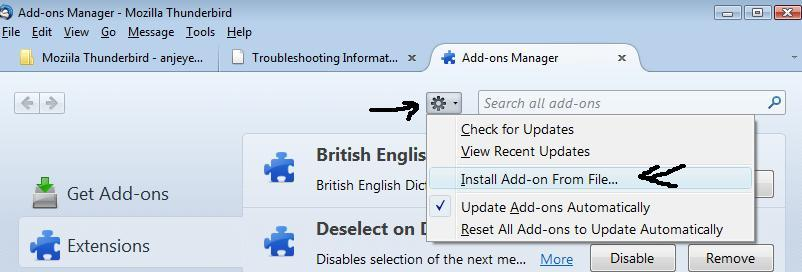
download addon to eg: desktop In Thunderbird Tools > addons or Menu Icon > Addons
click on gear icon and select 'Install addon from file' locate and select the file you downloaded and click on 'open' see image