


Search bar issue
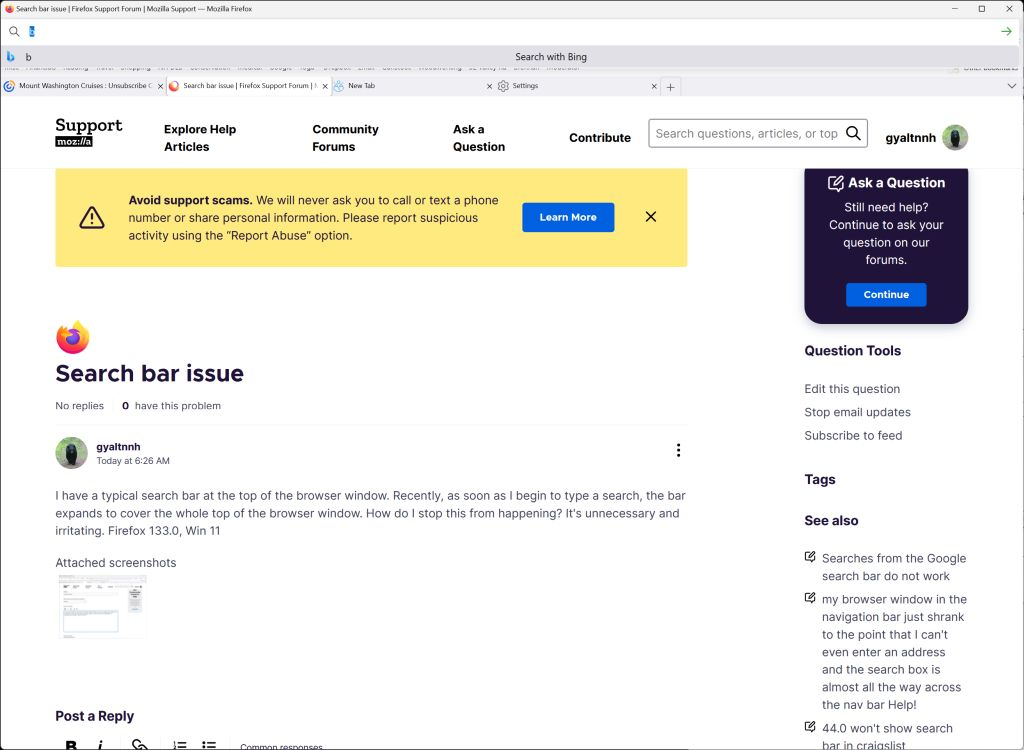
I have a typical search bar at the top of the browser window. Recently, as soon as I begin to type a search, the bar expands to cover the whole top of the browser window. How do I stop this from happening? It's unnecessary and irritating. Firefox 133.0, Win 11
I have a typical search bar at the top of the browser window. Recently, as soon as I begin to type a search, the bar expands to cover the whole top of the browser window. How do I stop this from happening? It's unnecessary and irritating. Firefox 133.0, Win 11
Modified by gyaltnnh
All Replies (4)
Do you use any custom userChrome.css file?
Yes, I do
Looks like it's broken in the new version.
What is "it", what part is broken, how do I fix it?