


What happened to the refresh botton on ff 4.0 and how do I get it back?

Upgraded to ff 4.0 and the refresh button is missing, it used to be next to the back button.
Solução escolhida
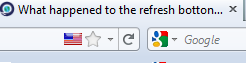
the refresh button is now tiny, on the right end of the "Awesome Bar," as in, the bar where you type stuff. it's also the 'stop' button, when a page is loading.
Ler esta resposta no contexto 👍 28Todas as respostas (5)
Solução escolhida
the refresh button is now tiny, on the right end of the "Awesome Bar," as in, the bar where you type stuff. it's also the 'stop' button, when a page is loading.
Shall I assume the 'Awesome Bar" is the address bar? And the reload button is the "C" with an arrow attached to the top?
The time when I want to use the Refresh button is when the page is loading too slowly. At that time, the Refresh button is gone and the Stop button replaces it. Not helpful.
I don't have an "awesome bar". I have a Navigation Tool and a Menu Bar. I can't find a refresh button in either of them. Any other suggestions?
georgevancouver, when people are referring to the Awesome bar they are really referring to the Location (address) bar where you say type in www.mozilla.com
The refresh button may be a combined refresh/stop button in the far right of the Location (address) bar.
Right-click the Menu bar and select Customize and you can then move those and other buttons around to where ever you want.
sumo/mozillaZine mod
Modificado por James a