


Windows 10 reached EOS (end of support) on October 14, 2025. If you are on Windows 10, see this article.

Pesquisar no apoio

Evite burlas no apoio. Nunca iremos solicitar que telefone ou envie uma mensagem de texto para um número de telefone ou que partilhe informações pessoais. Por favor, reporte atividades suspeitas utilizando a opção "Reportar abuso".

Saber mais

How do I stop an image from moving or block it?

  • 2 respostas
  • 1 tem este problema
  • 73 visualizações
  • Última resposta por Terry
  • Arquivadas

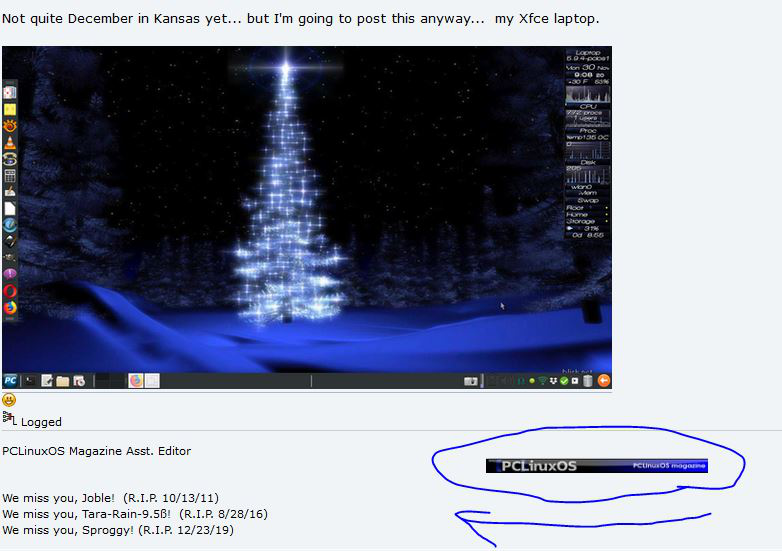
I would like to stop the image moving or block it once and for all. The animated image is shown here: https://www.pclinuxos.com/forum/index.php/topic,154209.msg1323298.html#msg1323298

It is in the poster's signature; it doesn't just move across the page once, it keeps moving across; now another user of that forum has added it to his signature also.

I have these in about:config: image.animation_mode none ui.prefersReducedMotion 1

I have tried blocking the element with uBlock Origin and stopping javascript on the site. I can remove it using another add-on but that only works for that occasion. I don't want to install NoScript because it stops Facebook working.

I would like to stop the image moving or block it once and for all. The animated image is shown here: https://www.pclinuxos.com/forum/index.php/topic,154209.msg1323298.html#msg1323298 It is in the poster's signature; it doesn't just move across the page once, it keeps moving across; now another user of that forum has added it to his signature also. I have these in about:config: image.animation_mode none ui.prefersReducedMotion 1 I have tried blocking the element with uBlock Origin and stopping javascript on the site. I can remove it using another add-on but that only works for that occasion. I don't want to install NoScript because it stops Facebook working.
Capturas de ecrã anexadas

Modificado por Terry a

Todas as respostas (2)

It might be a gif image.
Thanks. It's a .jpg.