


Cannot delete bookmarks - some delete most won't

I am trying to clean up my bookmarks. When I right click to delete nothing happens. I've also cannot do it in 'Show all Bookmarks' ...
Solução escolhida
I am glad to hear that your problem has been resolved. If you haven't already, please select the answer that solves the problem. This will help other users with similar problems find the solution more easily.
Thank you for contacting Mozilla Support.
If you have sync, and there is a problem anywhere, Shut Down Sync Immediately On All Devices to prevent the problem from spreading. Once the problem is fixed, perform the same repair on all computers/profiles before using sync again.
Ler esta resposta no contexto 👍 1Todas as respostas (10)

Places Maintenance [v57+] Type about:support<enter> in the address bar.
You will find Places Database near the bottom. Press the Verify Integrity button.
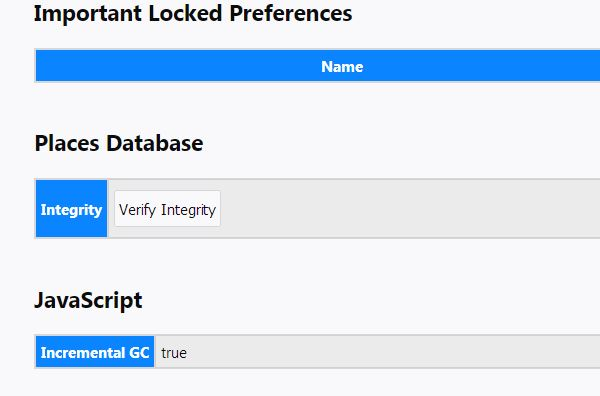
Did that ... and it appears to have verified integrity. Still unable to delete bookmarks.
Are you using any sync?
Yes ... if you mean Firefox sync yes.
Its possible sync is causing the issue. Disable sync. Is the problem still there?
That was the answer ...
Thank you
Solução escolhida
I am glad to hear that your problem has been resolved. If you haven't already, please select the answer that solves the problem. This will help other users with similar problems find the solution more easily.
Thank you for contacting Mozilla Support.
If you have sync, and there is a problem anywhere, Shut Down Sync Immediately On All Devices to prevent the problem from spreading. Once the problem is fixed, perform the same repair on all computers/profiles before using sync again.
FredMcD powiedział
Places Maintenance [v57+] Type about:support<enter> in the address bar. You will find Places Database near the bottom. Press the Verify Integrity button.
I have the same problem: I can manage bookmarks but I can't delete any of them... I don't sync bookmarks and just Refreshed my Firefox because I had problems with disappearing passwords.
Checking Integrity gave me result: > Task: checkIntegrity - Unable to check database integrity > Task: invalidateCaches - The task queue was cleared by an error in another task. > Task: checkCoherence - The task queue was cleared by an error in another task. > Task: expire - The task queue was cleared by an error in another task. > Task: vacuum - The task queue was cleared by an error in another task. > Task: stats - The task queue was cleared by an error in another task. > Task: _refreshUI - The task queue was cleared by an error in another task.
R3TZ3V Start Firefox in Safe Mode {web link} by holding down the <Shift> (Mac=Options) key, and then starting Firefox.
A small dialog should appear. Click Start In Safe Mode (not Refresh). Then try Places Maintenance again.
Is the problem still there? If so,
Please go to the top of any support.mozilla.org web page and use the Ask A Question link; https://support.mozilla.org/en-US/questions/new Select the product for what the problem is (Firefox or whatever).
Now select the category for the problem. At the bottom is Other.
Describe the problem in brief (one line). Then press <enter>. The website will display any prior posts that might help you. If nothing on the list can help, at the bottom press the button; None Of These Solve My Problem.
Now enter all the relative information on the problem. At the bottom of this, you can Add Images.
Under this is Troubleshooting Information. Please press the Share Data button. This will let us look at your system details. No Personal Information Is Collected.
FredMcD said
R3TZ3V Start Firefox in Safe Mode {web link} by holding down the <Shift> (Mac=Options) key, and then starting Firefox. A small dialog should appear. Click Start In Safe Mode (not Refresh). Then try Places Maintenance again. Is the problem still there? If so, Please go to the top of any support.mozilla.org web page and use the Ask A Question link; https://support.mozilla.org/en-US/questions/new Select the product for what the problem is (Firefox or whatever). Now select the category for the problem. At the bottom is Other. Describe the problem in brief (one line). Then press <enter>. The website will display any prior posts that might help you. If nothing on the list can help, at the bottom press the button; None Of These Solve My Problem. Now enter all the relative information on the problem. At the bottom of this, you can Add Images. Under this is Troubleshooting Information. Please press the Share Data button. This will let us look at your system details. No Personal Information Is Collected.
Safe Mode didn't work. My question is also here: https://support.mozilla.org/en-US/questions/1209416