


email not working - cannot send or receive emails

Hi - my Thunderbird hasn't been working for the last few days. I cannot send or receive emails. I can still access my email through the Telstra Webmail site but not through Thunderbird.
Todas as respostas (7)
Please add the troubleshooting information to your post To find the Troubleshooting information:
- Open Help (or click on three-line-icon and select Help)
- Choose Troubleshooting Information
- Use the button Copy to clipboard to select all. Do not check box "Include account names"!
- Paste this in your post.
Please also add the result of these troubleshooting steps to your post
- Does Thunderbird work in TB Safe mode (see Thunderbird Safe Mode)?
- Do you use anti-virus and firewall software? What is the version?
You might also want to check your settings Telstra notified me of new server settings for my accounts a year ago. Perhaps they got sick of waiting for everyone to update and turned the old servers off.
See my blog post here https://thunderbirdtweaks.blogspot.com.au/2016/09/bigpond-mail-changes.html
'''Here is the Troubleshooting info (minus the Important Modified Preferences - there was a LOT of info in that section!!) '
Application Basics
   Name: Thunderbird
   Version: 52.3.0
   User Agent: Mozilla/5.0 (Windows NT 10.0; WOW64; rv:52.0) Gecko/20100101 Thunderbird/52.3.0
   Profile Folder: Open Folder
             (Local drive)
   Application Build ID: 20170815040357
   Enabled Plugins: about:plugins
   Build Configuration: about:buildconfig
   Memory Use: about:memory
   Profiles: about:profiles
 Mail and News Accounts
   account1:
     INCOMING: account1, , (none) Local Folders, plain, passwordCleartext
   account5:
     INCOMING: account5, , (imap) pop.telstra.com:995, SSL, passwordCleartext
     OUTGOING: , smtp.telstra.com:465, SSL, passwordCleartext, true
 Crash Reports
   https://crash-stats.mozilla.com/report/index/bp-81b6d124-fa82-46e9-aa38-1e4d10171008 (8/10/2017)
 Extensions
   Lightning, 5.4.3, false, {e2fda1a4-762b-4020-b5ad-a41df1933103}
   Test Pilot for Thunderbird, 1.3.10, false, tbtestpilot@labs.mozilla.com
- TB doesn't seem to be working fully in Safe Mode - when I try to access emails it comes up with msg as per below.
- I use ESET anti-virus version 10.1.219.0

Here are screen shots of my settings, changes as per your blog post.
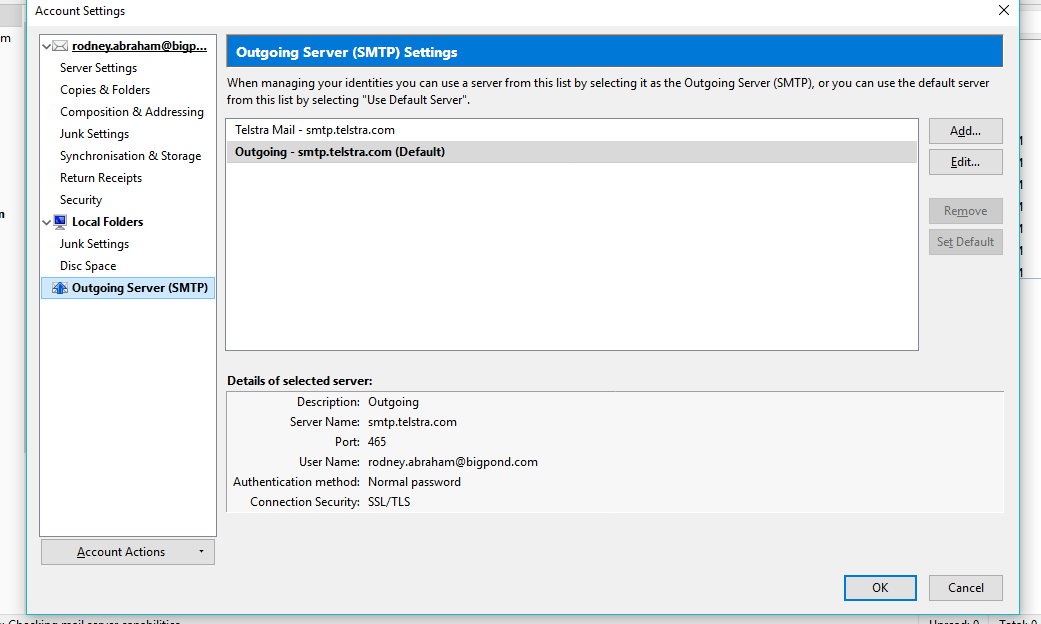
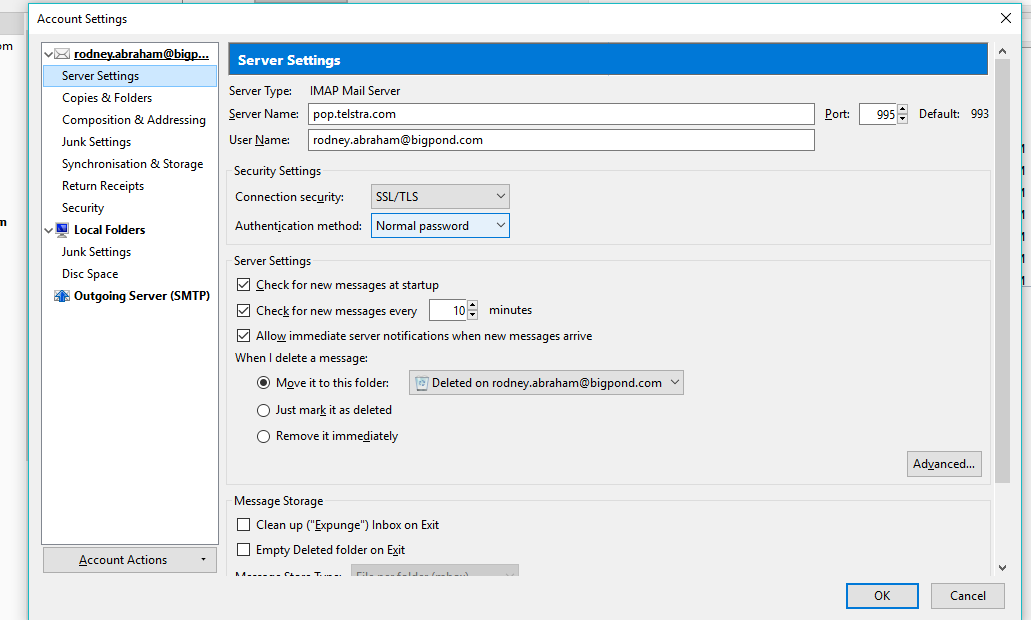
Ok sfhowes I did that (I also think that is how it was set up before the problem started), but I am still getting the same error message.
Alright - ran computer in Windows safe mode, still same problem
General info: http://kb.mozillazine.org/Not_an_IMAP4_server
Perhaps Matt's response could have some logic. As a user of an older bigpond account, perhaps you were on an imap server and it has been withdrawn.
https://www.telstra.com.au/support/category/email/set-up/imap-pop-and-smtp-information-for-manual-email-set-up Please note, IMAP is only available for customers using the new Telstra Mail platform
Do you know if you are using the new telstra mail platform or not?
As 'account 5' is already setup as 'imap', leave it alone for now and create a new existing mail account for same email address, but this time after thunderbird has tried to locate configuration settings - before creating the mail account, check it is for a pop mail account and use the pop settings as advised at this link for older bigpond accounts. https://www.telstra.com.au/support/category/email/set-up/imap-pop-and-smtp-information-for-manual-email-set-up If those pop settings do not work, then use the pop settings as advised by Matt at the link he gave.
Wow I actually think it might be fixed!! Thank you!!!!