


I could not activate "add to cart" buttons on ebay with FF 55.0.3 64 bit, but Chrome worked - anyone know why?

I could click the button, but nothing happened. I turned off Addblock+, reloaded the page, but nothing changed.
Any suggestions?

Solução escolhida
Start Firefox in Safe Mode {web link} by holding down the <Shift> (Mac=Options) key, and then starting Firefox.
A small dialog should appear. Click Start In Safe Mode (not Refresh). Is the problem still there?
Try to disable multi-process tabs in Firefox. You can disable multi-process tabs in Firefox by setting the related prefs to false on the about:config page.
browser.tabs.remote.autostart = false browser.tabs.remote.autostart.2 = false
http://www.ghacks.net/2016/07/22/multi-process-firefox/
Type about:config<enter> in the address bar. If a warning screen comes up, press the Be Careful button. At the top of the screen is a search bar.
Ler esta resposta no contexto 👍 1Todas as respostas (8)

Many site issues can be caused by corrupt cookies or cache.
- Clear the Cache and
- Remove Cookies
Warning ! ! This will log you out of sites you're logged in to. You may also lose any settings for that website.
Type about:preferences<enter> in the address bar.
- Cookies; Select Privacy. Under History, select
Firefox will Use Custom Settings. Press the button on the right side called Show Cookies. Use the search bar to look for the site. Note; There may be more than one entry. Remove All of them.
- Cache; Select Advanced > Network. Across from
Cached Web Content, Press Clear Now.
If there is still a problem, Start Firefox in Safe Mode {web link} A small dialog should appear. Click Start In Safe Mode (not Refresh). While you are in safe mode;
Try disabling graphics hardware acceleration in Firefox. Since this feature was added to Firefox it has gradually improved but there are still a few glitches.
You will need to restart Firefox for this to take effect so save all work first (e.g., mail you are composing, online documents you're editing, etc.,) and then perform these steps:
In Firefox 54 and below:
- Click the menu button
 and select Options (Windows) or Preferences (Mac, Linux).
- Select the Advanced panel and the General tab.
- Uncheck Use hardware acceleration when available.
- Close Firefox completely and then restart Firefox to see if the problem persists.
In Firefox 55 and above:
- Click the menu button and select Options (Windows) or Preferences (Mac, Linux).
- Select the General panel.
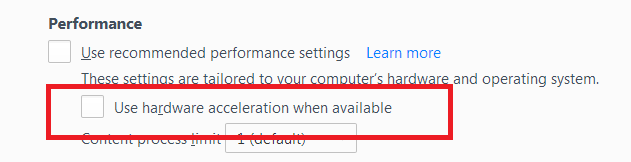
- Under Performance, uncheck Use recommended performance settings. Additional settings will be displayed.
- Uncheck Use hardware acceleration when available.
- Close Firefox completely and then restart Firefox to see if the problem persists.
Did this fix your problems? Please report back to us!
If the problem is resolved, you should check for updates for your graphics driver by following the steps mentioned in these Knowledge base articles:
Hi Fred - thanks for taking the time to respond.
I tried the easy stuff - deleted ebay cookies, unchecked h/w acceleration, cleared cache, restarted FF. I got a successful purchase button click once, before it stopped working again.
Since I am running Windows 10 on a MS Surface tablet which pretty much keeps everything up to date I think using chrome to shop ebay is easier than going through the potential mess with new graphics drivers.
Have you disabled graphics hardware? Do you have this problem with other sites?
Hi Fred,
I find that FF may (occasionally) take a couple of clicks to activate a web button/menu and have chalked that up to fat fingers, but Ebay was the first site that I could not use with FF.
For example, I recently successfully used FF with items from Allied Electronics .
Remove History For One Site
Open the History Manager <Control><Shift> H. In the search bar, enter the name of the site. Right-click on one of the listings and select Forget About This Site. This should remove all information, including any passwords / settings.
No change Fred - still does not work.
Solução escolhida
Start Firefox in Safe Mode {web link} by holding down the <Shift> (Mac=Options) key, and then starting Firefox.
A small dialog should appear. Click Start In Safe Mode (not Refresh). Is the problem still there?
Try to disable multi-process tabs in Firefox. You can disable multi-process tabs in Firefox by setting the related prefs to false on the about:config page.
browser.tabs.remote.autostart = false browser.tabs.remote.autostart.2 = false
http://www.ghacks.net/2016/07/22/multi-process-firefox/
Type about:config<enter> in the address bar. If a warning screen comes up, press the Be Careful button. At the top of the screen is a search bar.
You can look at uBlock Origin as a replacement for Adblock Plus to see if that works better.