


why does firefox look fuzzy and blurry after a windows 10 update?

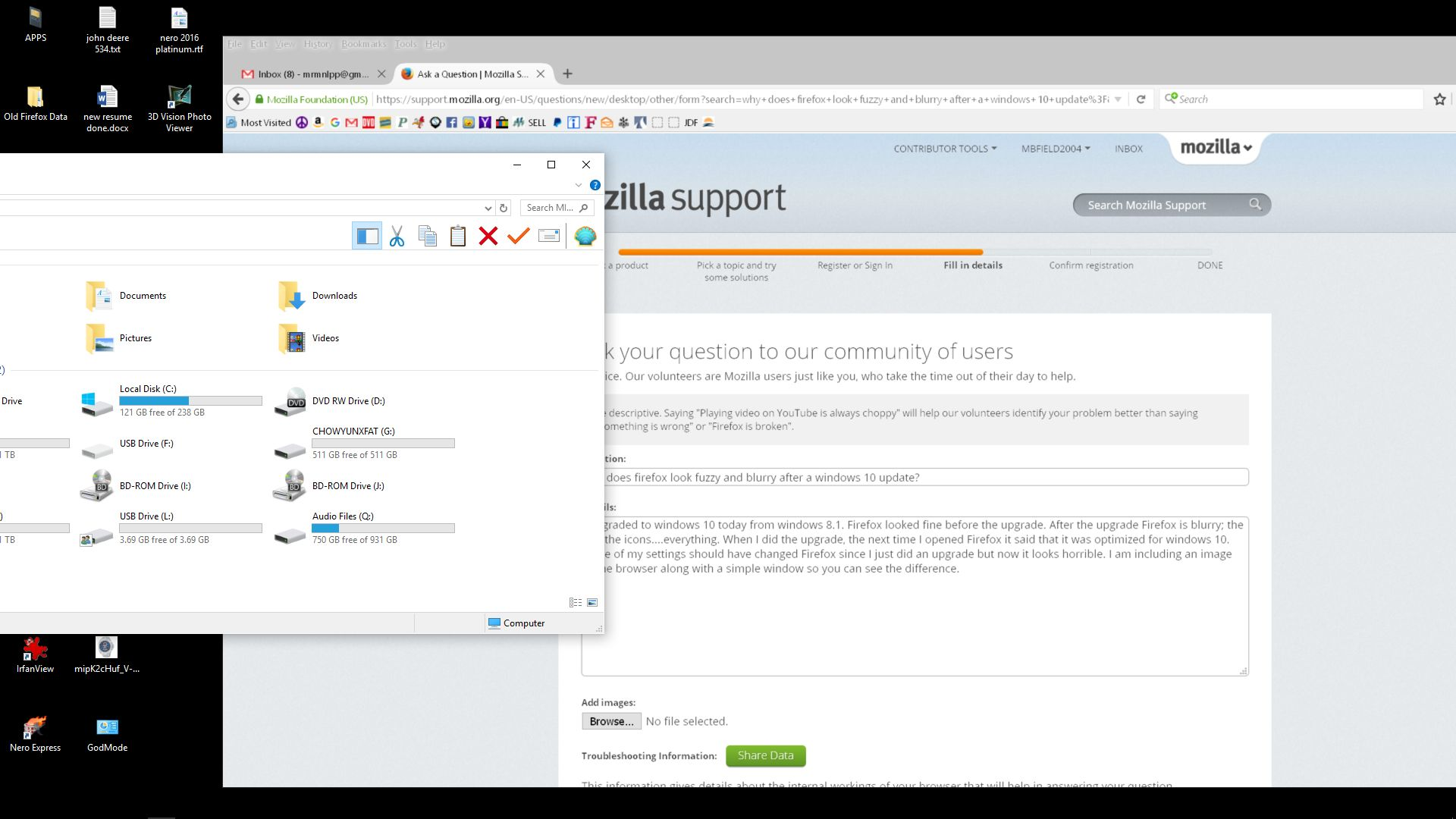
I am an expert windows user, not advanced....expert. I recently upgraded to windows 10 64bit from windows 8.1 64 bit. Now Firefox is blurry. The tabs are blurry and the icons are blurry. I did not change anything in the about:config and other windows look fine when I open them. Why is Firefox looking horrible? How do I fix this? I have uploaded an image of the desktop with a normal window and Firefox so you can see the difference.
Solução escolhida
I'll just highlight the protected mode issue: That feature has security benefits, but seems to have serious compatibility issues on some systems. You can disable it using the Add-ons page. Either:
- Ctrl+Shift+a
- "3-bar" menu button (or Tools menu) > Add-ons
In the left column, click Plugins. On the right side, find "Shockwave Flash" and click the More link. Then uncheck the box for "Enable Adobe Flash protected mode" and try that for a day to see whether it helps.
Ler esta resposta no contexto 👍 0Todas as respostas (5)
there have been over 120 crashes since I installed windows 10. I'm pretty sure I set everything back the way it was before I installed windows 10 without much success except the initial problem with blurriness has been fixed. my last crash report was this
https://crash-stats.mozilla.com/report/index/470889f6-f894-419e-9ccf-1b3ec2151214
it is flash. I installed the firefox plugin you linked and that does not help....firefox still crashes on certain websites and the website says install the latest flash...which I have. Is there a way to reset everything in about:config to default settings? I don't know if that would help but at this point I doubt it would hurt. One odd thing is that firefox reports th OS as windows 7 when it is windows 10. I think Firefox has some work to do with compatibility issues even though when Firefox first opened after the windows 10 upgrade it said it was compatible.
You can check for problems with current Shockwave Flash plugin versions and hardware acceleration in Firefox and try this:
- make sure you have the latest Flash version:
http://www.adobe.com/special/products/flashplayer/fp_distribution3.html - check for updates for your graphics drive drivers
https://support.mozilla.org/kb/upgrade-graphics-drivers-use-hardware-acceleration - disable protected mode in the Flash plugin (Windows Vista and later)
https://support.mozilla.org/kb/adobe-flash-protected-mode-firefox - disable hardware acceleration in the Flash plugin
https://helpx.adobe.com/flash-player/kb/video-playback-issues.html - disable hardware acceleration in Firefox
https://support.mozilla.org/kb/upgrade-graphics-drivers-use-hardware-acceleration
See also:
Solução escolhida
I'll just highlight the protected mode issue: That feature has security benefits, but seems to have serious compatibility issues on some systems. You can disable it using the Add-ons page. Either:
- Ctrl+Shift+a
- "3-bar" menu button (or Tools menu) > Add-ons
In the left column, click Plugins. On the right side, find "Shockwave Flash" and click the More link. Then uncheck the box for "Enable Adobe Flash protected mode" and try that for a day to see whether it helps.
have the latest flash, graphics drivers and everything. I turned off protection and the accelerators in flash in both places and that seems like it may have helped. Thanks; that took a long time and I hope it is permanent.
You can check for problems with current Shockwave Flash plugin versions and hardware acceleration in Firefox and try this:
   make sure you have the latest Flash version:
   http://www.adobe.com/special/products/flashplayer/fp_distribution3.html
   check for updates for your graphics drive drivers
   https://support.mozilla.org/kb/upgrade-graphics-drivers-use-hardware-acceleration
   disable protected mode in the Flash plugin (Windows Vista and later)
   https://support.mozilla.org/kb/adobe-flash-protected-mode-firefox
   disable hardware acceleration in the Flash plugin
   https://helpx.adobe.com/flash-player/kb/video-playback-issues.html
   disable hardware acceleration in Firefox
   https://support.mozilla.org/kb/upgrade-graphics-drivers-use-hardware-acceleration
See also:
http://kb.mozillazine.org/Flash#Troubleshooting
I did all of this and it seems to have worked, took a long while and I hope it lasts. SNAFU for windows upgrades it seems too!