

Esta discussão foi arquivada.
Se precisar de ajuda, por favor, coloque uma nova questão.

Arquivadas
Why do number spinners display without a top border and drop downs ignore the css styling?

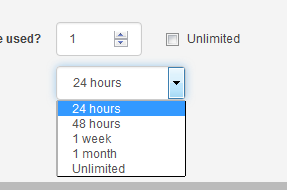
I have a simple number spinner and the top border is missing from the control.
When you view the options in a drop down the border to the options is a very harsh black on the bottom and right edges.
We are using bootstrap and firefox doesn't seem to like it at all.
Is there a css setting that can change this as none of the usual border-color/width/style options appear to have any effect at all?
I have a simple number spinner and the top border is missing from the control.
When you view the options in a drop down the border to the options is a very harsh black on the bottom and right edges.
We are using bootstrap and firefox doesn't seem to like it at all.
Is there a css setting that can change this as none of the usual border-color/width/style options appear to have any effect at all?
Todas as respostas (2)
Start Firefox in Safe Mode to check if one of the extensions (Firefox menu button/Tools > Add-ons > Extensions) or if hardware acceleration is causing the problem.
- Switch to the DEFAULT theme: Firefox menu button/Tools > Add-ons > Appearance
- Do NOT click the Reset button on the Safe Mode start window