


"Private browsing" window doesn't close after opening web site

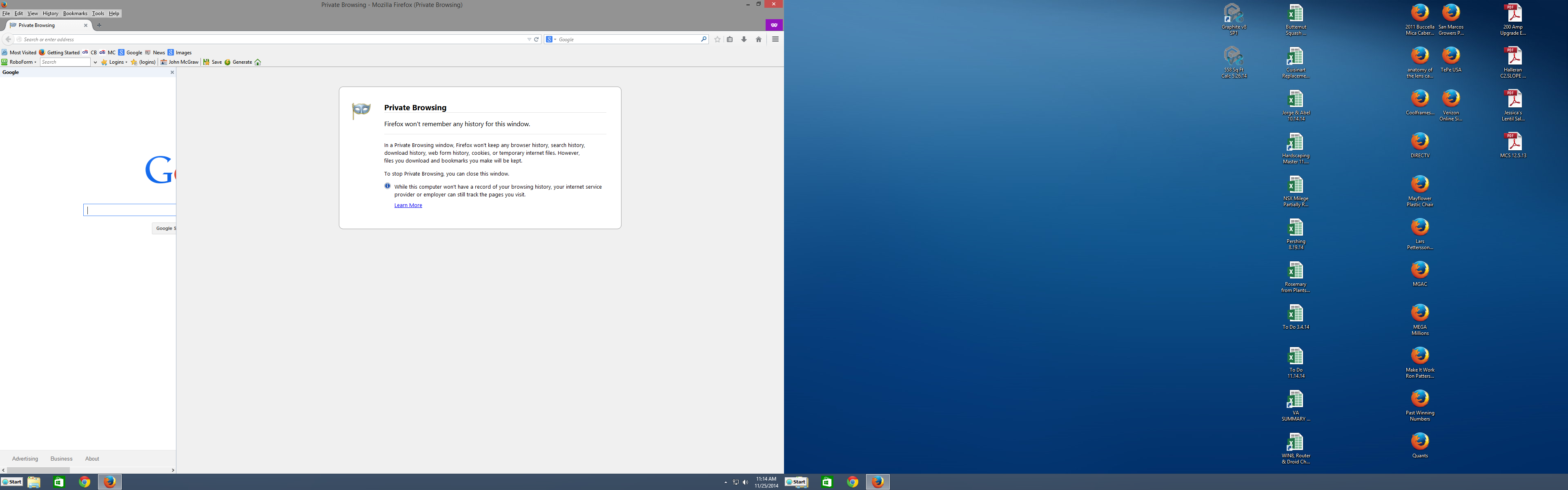
"Private Browsing" window doesn't close after opening a web site; it remains on the wight side of the screen and can't be closed.
Wen site appears only partially on the left side of the screen & can be closed.
Solução escolhida
Problem solved. Removed & replaced bookmarks & now everything works according to plan. Thanks
Ler esta resposta no contexto 👍 0Todas as respostas (4)
Please provide a screenshot of that.
https://support.mozilla.org/en-US/kb/how-do-i-create-screenshot-my-problem
It is best to use a compressed image type like PNG or JPG to save the screenshot and make sure that you do not exceed a maximum file size of 1 MB.
Then use the Browse .... button below the Post a Reply text box to upload the screenshot.
Here's a screen shot.
Solução escolhida
Problem solved. Removed & replaced bookmarks & now everything works according to plan. Thanks
Looks that you were opening a bookmark in the sidebar and left the tab with the private browsing message open.
Opening in the sidebar is the default for bookmarks that are created via a link or button on a website. You can check the properties of a bookmark via the right-click context menu in the sidebar (Ctrl+B; Command+B on Mac). In the Bookmarks Manager (Bookmarks > Show All Bookmarks) you can click the More button in the Details pane at the bottom right. Make sure that "Load this bookmark in the sidebar" is not selected.