


Get mail box full message when trying to send an email

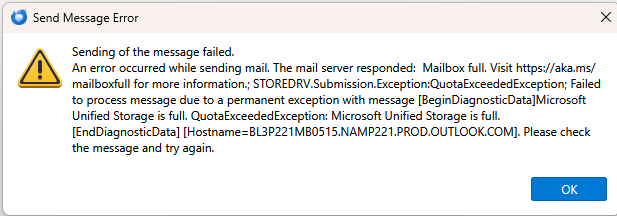
Today when trying to send an email I get Sending of message failed. The mail server responded: Mailbox full. I use an Outlook address. I have emptied my trash, spam, and sent items folders along with moving many of the contents of my folders to the Local folders.
All Replies (2)

Penyelesaian Terpilih
Is this an IMAP account or POP3?
This is a message from the mail server, relayed to you by but not generated by Thunderbird. so you can take it seriously: rightly or wrongly, the server thinks you have exceeded your storage quota. That may or may not be accurate - they could be having technical issues on their end. Only they can fix it. Perhaps they already know about it and are working on it, and you might find it goes away after a while.
Your options for now are:
- Go to the webmail page and make sure that you do, indeed, have room to spare.
- Call them and describe the error message and ask them for advice and for status of any fix.
I don't know much about Microsoft's cloud service, but the phrase "Unified Storage" in the error message makes me wonder if they have a limit to ALL your online storage, which might include general file storage, backups, pictures, etc. AS WELL AS email. That might lead you to think you more room than you really do.
Diubah oleh Lin
Thank you so much Lin. YES! Unified storage is the case. I did go to the email webpage which was a great suggestion. It did show that I was over my free 5GB quota. But not for email. I only used 1.2GB of the allotted 15GB for email storage. They shut down my email so I will clean up the other files going to OneDrive. The thing is, I never set up to backup to OneDrive because I use another solution. So I did not know what was going to OneDrive and I still don't know why those files are going to OneDrive when I didn't set it up. Anyhow, I cleaned up the desktop, pictures, documents folders and I am now back below my quota. Of course MS hit me several times with buying more storage. $2 a month is not bad but I really don't want to manage another subscription and I don't know what other tentacles MS will get into me with the MS 365 subscription. Thanks again.