Sent mail not put in Sent folder

I've received the following message the last few days when I send an email with Thunderbird:
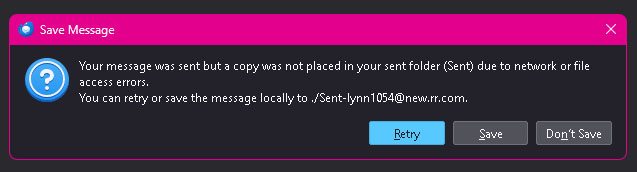
Your message was sent but a copy was not placed in your sent folder (Sent) due to network or file access errors. (I am sure neither of those errors apply.)
It then gave me the option to "save" (I didn't get the exact wording before I clicked on "save") and I don't see it anywhere. This was a very important email and I need to find it.
Penyelesaian Terpilih
I've resorted to that also, copying before it's lost. If this happens regularly, you may wish to change setting to store sent messages locally.
All Replies (11)
Unfortunately, that error message is very likely true. I also receive it on occasion when there are network issues. The 'save message' may have been just a retry: the exact wording would be helpful. My experience is that an option isn't offered.
It gets stranger and stranger. The person wrote back to me - but that message only showed up in Spectrum's webmail, not Thunderbird. Since the person quoted me, I do have the entire email I had sent thank goodness. So on the Spectrum webmail site, I moved the message I received today to a different folder and now at least that, too, is in Thunderbird. If that happens again, I will copy and paste the message I'm attempting to send before it asks me about "saving" - in that way I will be able to say exactly what that "saving" message says.
Penyelesaian Terpilih
I've resorted to that also, copying before it's lost. If this happens regularly, you may wish to change setting to store sent messages locally.
It's happening more and more often now that email I send is not put into the Sent folder. Is Thunderbird really that unstable? I've gotten to the point now where when I write an email, I do so on the Spectrum webmail site to be sure I can see it in my sent items. On Thunderbird, I have a folder called SentMail where sometimes (not always) emails I've written on the Spectrum webmail site will show up in Thunderbird. David had said "If this happens regularly, you may wish to change setting to store sent messages locally." Please tell me how to do this?
Click 'account settings; in menu' Then, click the 'copies&folders link under the account name in left sidebar There, you can change where sent items are filed.
On your question, Thunderbird is incredibly stable because it was designed to be stupid. Seriously, it does exactly what it is told in the setup. It does not guess or interpret the settings. When problems surface, there are generally due to external interference.
I still chose the Sent folder but in a little different way. I then sent myself a test message and it was immediately in there. I will send some more test messages to myself in the next few days and see if each and every one of them shows up there.
As for when problems surface that it is generally due to external interference.... but then why do they end up in y Sent Mail folder when using Spectrum webmail reliably each and every time?
When using web mail, your access is not the same as when using a personal computer.
Could you please explain - what is different? I use the web mail on my computer.
Your webmail is done on their web IP address and the web server. your email is done from your pc's IP address and the SMTP web server
The only thing I changed (not really a change in my eyes) is under Copies & Folders, where it says Place a copy, I changed it from in "Sent" Folder on {my email address} to Other - Sent on {my email address}
So really, it's the same place. What I do notice though is that when I had it set to in "Sent" Folder on {my email address}, once it came up saying it was sending, it then came up saying it was putting a copy in the Sent Folder (but wasn't actually doing that). Since I changed it to "Other" (still directing it to the same place), it comes up with saying it is sending but does not come up saying it is putting a copy. It's worked with the test messages I've done so far in that the test messages are indeed coming up in my Sent folder now.
From what I see, if I write an email through Spectrum webmail, the sent message comes up in the SentMail folder rather than the Sent folder. There is also a folder named Sent Items that has some messages in there - who knows where I wrote those messages from that they ended up in an entirely different folder - possibly Outlook. (I did not create the Sent Items and SentMail folders - somehow Thunderbird did that on its own. I really love Thunderbird. I had used Windows Live Mail for years, then tried Outlook which did not impress me. I had known Thunderbird was out there for years. I don't know why it took me so long to try it!
I think I'm going to give up on writing emails with Thunderbird. All my test messages were working fine. So I (stupidly) took the chance of sending an important email and it happened again. At first, it said it couldn't even send the email, then it came up with what the image I am attaching says. I did click save but that did nothing. The email is forever lost.