


New Install on Win 11 will not send emails.

Hi all I have recently installed Thunderbird on a PC that didn't have an mail program. Its Win 11 and includes Malwarebytes and Norton 360 for security Thunderbird 154.0, (64 bit)
I followed the set up as I have done many times before and previously had no problem. I am using Plusnet and have set incoming mail as POP3 on port 995. I have set outgoing mail to SMTP and port 465 ( plusnet recommended 587 doesnt work at all) I have set my login name and password. Security is SSL/TLS
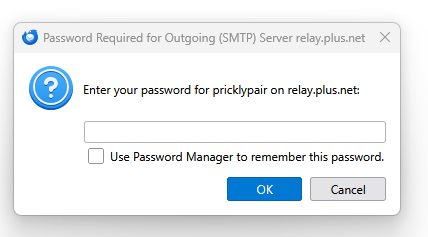
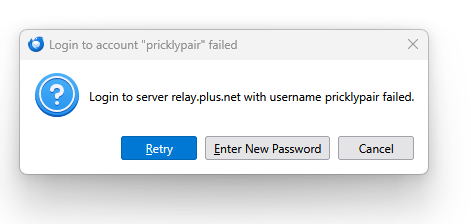
Incoming mail is received normally Outgoing mail asks for my password as on attachment Entering a password doesn't work and results in another error message
Any suggestions? Cheers Keith Keith
Any suggestions
Penyelesaian Terpilih
Sorted It was due to password saving Once "save password" was ticked in the main options menu for sending mail (receiving was already ticked) and the correct password entered it worked. Due to finger trouble I had also been entering an incorrect password!
All Replies (4)
Just a comment: most email providers want the full email address as user name.
Plusnet don't as the address can be <anything you like>@<username>.plus.net
The settings are the same as on the previous PC that I have moved from.
Penyelesaian Terpilih
Sorted It was due to password saving Once "save password" was ticked in the main options menu for sending mail (receiving was already ticked) and the correct password entered it worked. Due to finger trouble I had also been entering an incorrect password!
Thanks for sharing. I'm glad all worked out. :)