


Inbox issue with displaying all emails

My inbox shows only 3 unread emails, but the total for the folder shows 32. If I use filter for 'attachment emails' it displays 12 emails but not the unread ones. I have played with the filters and it will only display 3 unread and if selected 12 attachment emails. I have two accounts on thunderbird email client on Win 11 and the other one is fine, this one only started to have the display issues over the last week. I have compared all the settings for both accounts and they are the same (except for addresses). How can i get the inbox to show all 32 emails
All Replies (3)
The first step is to right click the folder, select properties and then the repair button. Just in case there is a problem with your mails database index, that will fix it.
Please post back your results.
Diubah oleh Matt
Hi Matt thanks for the response, I had done that (a couple of times) no positive outcome.
Ok now we get into the nitty gritty. All vague and all relevant perhaps
Thunderbird message counts in the folder pane come in two kinds. There are the basic message counts you get what a folder with sub folders is displayed with the subfolders open.
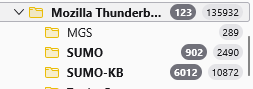
Then there is the summary that is displayed if the folders are collapsed.

Those results are quite different, but both are accurate as far as they go, despite perhaps misleading those that do not know that collapsed counts include sub-folders. Note that the main clue as to which value you are seeing is the color of the count font and the background of the liuttle blob that the information is contained in.
Then there is the quick filter toolbar.

If any of the filters is selected like pinned or unread you will only see messages that match that selection, and they are cumulative, so selecting pined and unread would show on messages that were pinned and unread. This selection is also sticky, so remains set in some versions of Thunderbird, although I just noticed that is not the case with 153 which I am now using, but I think it was the case with the previous ESR version 140 you do not say what version of Thunderbird you are using, so I am trying to cover as many bases as I can.
Let me know how you go.