


Error Forwarding messagens

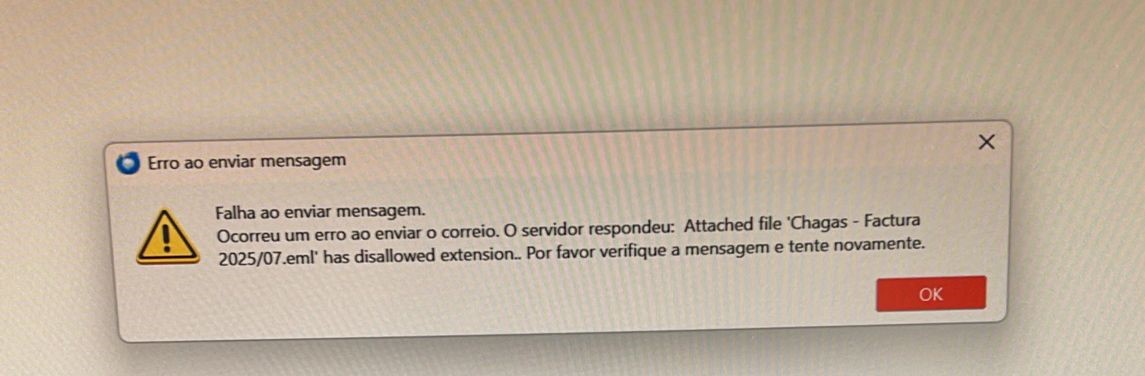
Hello, My thunderbird is displaying the following message when I forward an email. "An error occurred while sending the mail. the server responded the "name file.eml" attachment has been dissallowed extension". This error also occurs if the message you forward does not have attachments. my account is configured with pop. How can i solve the problem .
thanks
Penyelesaian terpilih
I'm getting a similar error all the time. Here it is:
Sending of the message failed. An error occurred while sending mail. The mail server responded: Attached file 'ForwardedMessage.eml' has disallowed extension.. Please check the message and try again.
I HAVE "Inline" attachment for forward message checked. My understanding is that the file it's complaining about ForwardedMessage.eml is actually generated by TB. No such file exists on my computer.
So how do I stop this message? BTW the message eventually gets sent.
Baca jawapan ini dalam konteks 👍 1All Replies (6)

I don't know why the server doesn't accept those attachments, but the attachment the server is complaining about is the very message you're trying to forward because you're forwarding the message as an attachment. It doesn't matter whether the forwarded message has attachments of its own or not.
The default forwarding mode can be changed in Settings > Composition. You may choose there to forward messages Inline instead of as attachments. You can also choose how you want to forward a particular message regardless of the default setting by right clicking on the message you want to forward and choosing Forward As.

Penyelesaian Terpilih
I'm getting a similar error all the time. Here it is:
Sending of the message failed. An error occurred while sending mail. The mail server responded: Attached file 'ForwardedMessage.eml' has disallowed extension.. Please check the message and try again.
I HAVE "Inline" attachment for forward message checked. My understanding is that the file it's complaining about ForwardedMessage.eml is actually generated by TB. No such file exists on my computer.
So how do I stop this message? BTW the message eventually gets sent.
The message is not generated by Thunderbird; it comes from the server and Thunderbird displays it so you know what issue the server dislikes. EML is a file extension for an e-mail message in the MIME RFC 822 standard.
Settings > Composition Forward message 'Inline' There is also a checkbox 'add extension to the filename' which if selected would only be added if forwarding as an attachment, otherwise the attachment would not have an extension and this means when user wants to open it, the computer would not know what to use - it would ask what to use, but the user may end up needing to use Notepad or similar as it's not a standard file used for email. So that add extension option ideally needs to be selected.
The option 'Forward as attachment' will add the forwarding email as a *.eml file
The option Forward inline does not add any attachment unless the original was forwarded to you as an attachment.
Possible Senario: You receive an email which was forwarded to you. You maybe be able to read the initailly received email because you have this option selected. View > 'display attachments inline'
but when you select to forward the email, it will get added as a eml file because that is how that email was sent to you.
Some servers do block eml files because they have them listed as possible threats.
How to get around the issue. In original email: Right click on the eml attachment and select Open Thunderbird will open in a new tab then click on 'Forward'
Hi thanks for help my problem
Best
Regards

Toad-Hall
Thanks for the input, HOWEVER I can compose a text email to myself with NO attachment and I still get the error. I am NOT forwarding an email.
Alan Heimlich said
Toad-Hall Thanks for the input, HOWEVER I can compose a text email to myself with NO attachment and I still get the error. I am NOT forwarding an email.
This question is specifically about 'forwarding', so your issue is different and therefore you should create your own quesion. But...are you saying you are creating a band new Write message with no attachments and you are getting an error message about attached eml files ? If yes, in your own question, please supply an image showing the error message received when you click on 'New Message' - create simple mail and then send. Also include information about what server you are using to send emails. If you have an Anti-Virus please make sure it's not scanning out going mail as it might be adding/appending something to your email.