


What is the bar that appears at the top of pages and how do I get rid of it?

Whenever a page is showing on the screen, a bar appears at the top of the page with a lot of squares ending with a square that says "diagnose." It sometimes causes a printing problem when the document prints out so small that you can't read it.
Chosen Solution
That seems to have done it. Thanks!!!!!
എല്ലാ മറുപടികളും (7)
It sounds like some kind of advertising. Often behaviors that affect multiple sites are caused by an add-on, particularly an extension. You may want to review your extensions on the following page and disable ALL nonessential extensions.
orange Firefox button or classic Tools menu > Add-ons > Extensions category
After restarting Firefox, is the bar gone?
Can you attach a screenshot?
- http://en.wikipedia.org/wiki/Screenshot
- https://support.mozilla.org/kb/how-do-i-create-screenshot-my-problem
Use a compressed image type like PNG or JPG to save the screenshot.
The "screenshot" is attached.
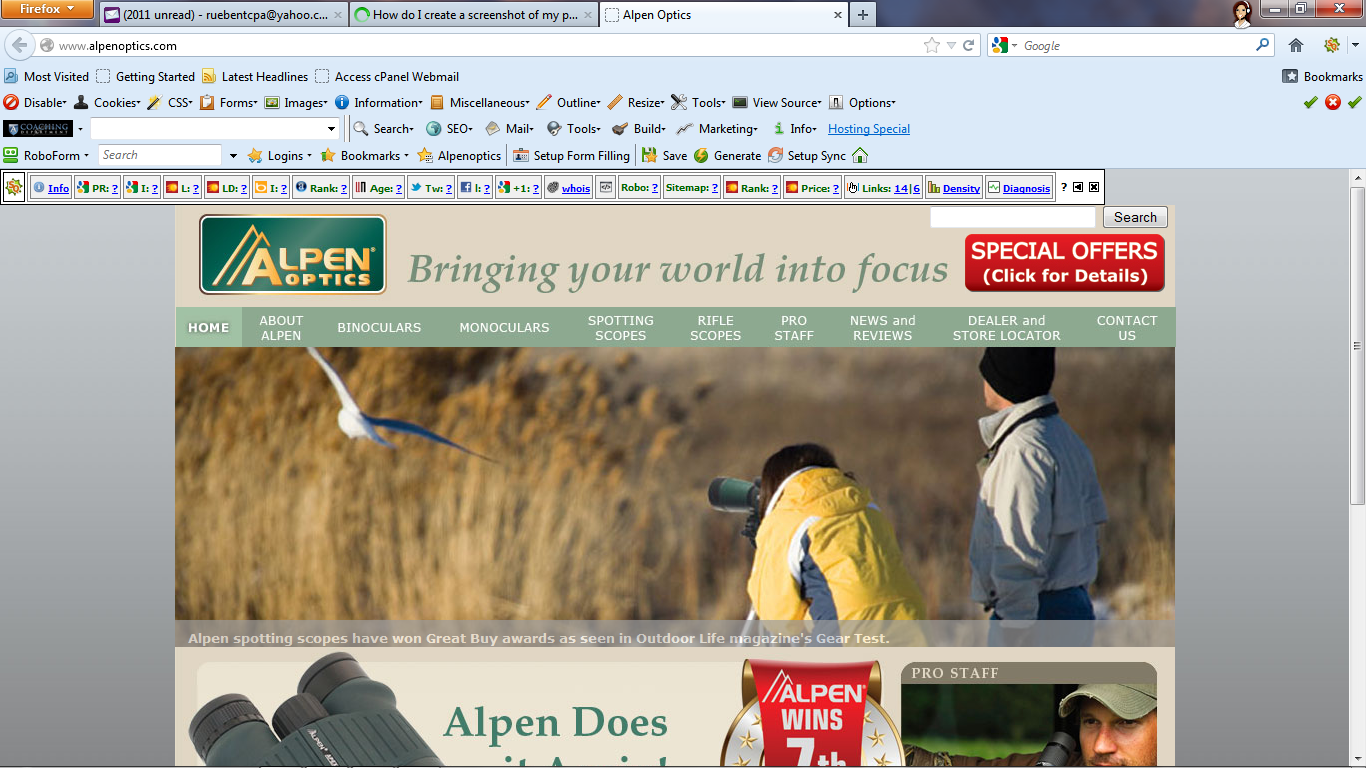
It's the SEOquake mini-bar from http://www.seoquake.com/
Edit: Or an imitator...
Modified by jscher2000 - Support Volunteer
How do I get rid of it or do I really want to?
It's an extension. Please see my earlier post about disabling unwanted extensions.
Chosen Solution
That seems to have done it. Thanks!!!!!