


Showing when there is Spam in the Accounts Spam Folder

A few times I have missed messages that have have been inadvertently placed in the Accounts Spam Folder. Is it possible to to indicate that the Spam Folder has contents in the same way contents are indicated in other Account Folders?
എല്ലാ മറുപടികളും (6)
Chosen Solution
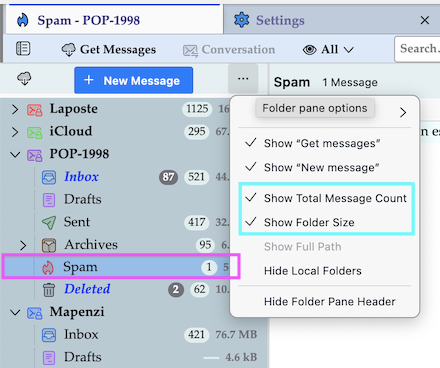
If you click on the "Folder pane options" ••• button at the top of the folder pane and check ✓"Show Total Message Count" the number of messages in every folder will be displayed, including the Spam folder.
Problem Solved
I have noticed that Spam Folders contents are only shown when entering when entering the email folder. Therefore you have to enter each email folder to see if you have Spam and it only shows up on the Unread Folders then. As solution?
If you have enabled to display Show Total Message Count you will always see when there are messages in the "Spam" folder, whether they are read or unread!
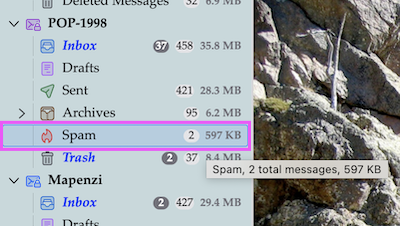
Show Total Message Count is Enabled but if I get a Spam Message it is not shown under Unread Folders until entering Email Folder
if you use "All Folders" you'll see the numbers, unread and total.