


Unable to save email PDF documents on my PC

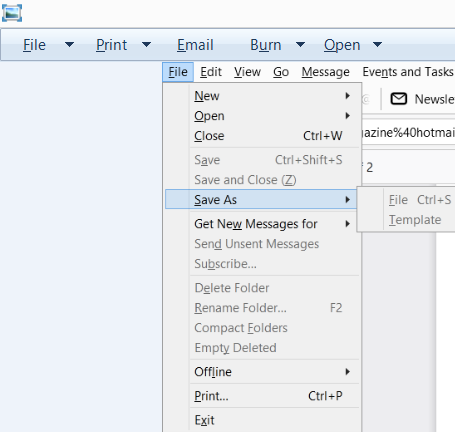
Since installing the latest Thunderbird mail release, there is no option to save email PDF attachments. When I click on 'Save As', the two options 'File' and 'Template' are greyed out. With all previous versions of Thunderbird, a pop up was displayed showing the default where a PDF would be saved - I think this was Document Cloud. BUT the pop up allowed me to search for and select the folder and sub folder on my PC where I wanted to save the document - and this met my needs perfectly.
This issue relates not only to new emails with PDF attachments, but all PDF files attached to 'old' emails sent before I installed the latest version of Thunderbird.
The Operating System of my PC is Windows 8.1. I have Adobe Acrobat Reader DC version 21.007.20099 installed.
Now I have to open the appropriate email account in Outlook each time I receive an email with PDF attachment I want to save, which is time consuming and frustrating!
Chosen solution
Thank you. I didn't do this before and the pop up appeared, but this solves my problem. Thank you.
Read this answer in context 👍 0എല്ലാ മറുപടികളും (2)

The Save As option in your screenshot is and has always been for saving messages, not attachments. For attachments, you need to right-click the files in the attachment panel (at the bottom of the message).
Chosen Solution
Thank you. I didn't do this before and the pop up appeared, but this solves my problem. Thank you.