


how do I display contacts in sidebar

Before one of the recent upgrades, I could see my contact list AKA Address Book(?) on the left column below Local Folders. F9 doesn't do anything. My O/S is the invasive stalker called Windows 10. Tbird version I see is 45.2.0 - fresh install The only Add-On (Plugin?) or Extension(?) I could find will not work with the upgrade.
TIA O
എല്ലാ മറുപടികളും (4)
re contact list AKA Address Book(?) on the left column below Local Folders.
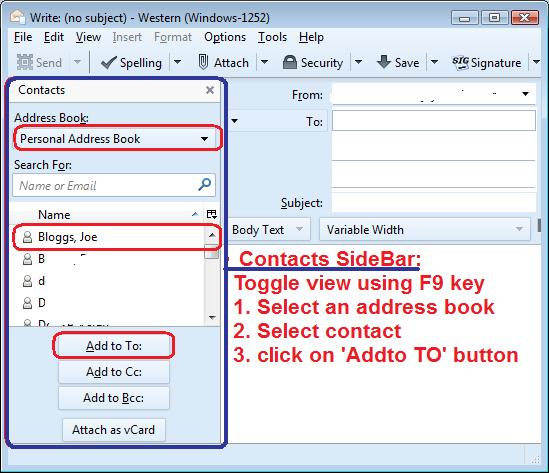
'Contacts Sidebar' pane is toggled on/off using F9 key or via 'Menu Bar' 'View' > 'Contacts Sidebar'.
However, this only occurs in the 'Write' window, when you are composing emails. So you need to click on 'Write' button first to open that window.
It does not appear in the left Folder Pane below 'Local Folders'. So in that respect there is nothing wrong.
See image below.
Modified by Toad-Hall
Chosen Solution
Edit - See Toad-Hall's answer
Modified by Gnospen
Thank you folks for your quick responses. I had a Plug-in before that pit the Contacts in a list below Local Folders. That was some time ago. Before, I could just click on a name/address and it would open the Write window with their address in the TO: box.
The F9 in the Write windows is a good idea I guess. Again, you people are appreciated for your help.
re : I had a Plug-in before that pit the Contacts in a list below Local Folders.
I think you may be refering to this addon extension:
Info says 'Works with Thunderbird 1.5b - 3.0a1'
It is rather old and doubt if it works with any of the recent versions. When those old versions were current, this addon may of been of use, but now Contacts Sidebar is part of the Write window by default.