


Stopped sending emails

I have been using Mozilla Thunderbird for decades and they have even contributed a small amount of money to Thunderbird periodically. Just within the last two or three days all of a sudden I have been unable to send emails with my phone. I receive emails, but I do not send them. So I opened up a laptop where I did not have Thunderbird and set it up properly through Spectrum using the incoming and outgoing servers as mail.twc.com. and yes, just like on my phone. I continue to receive new emails, but even with the laptop I was unable to send an email. I received the message"send message error sending a message failed. The message could not be sent because the connection to outgoing server smtp mail.twc.com was lost in the middle of the transaction. Try again."I contacted Spectrum twice and both times they had me try to send a message through their Web server spectrum.net and that message did go through. Of course then their response is that this has to be a problem with the third-party app meaning Mozilla Thunderbird, and they can’t help with that at all. I sure would appreciate some help because I hate to walk away from Thunderbird as well as change my email address after all of these decades.
All Replies (20)
I am not an expert with Spectrum, and they regularly deny all responsibility, as I see users posting regularly here with the same complaint. This info may help, but there are many varieties (I think) in Spectrum accounts:
https://www.spectrum.net/support/internet/email-settings/
incoming IMAP: mail.twc.com, 993, SSL/TLS, normal password, email address
outgoing SMTP: mail.twc.com, 587, STARTTLS, normal password, email address
thank you for your reply. Unfortunately, that doesn’t solve it because those are the settings I use and have been using. It’s only in the last two days. It stopped sending emails.
Did you start using a VPN or receive an update to the antivirus or VPN? The fact it also doesn't work on the phone suggests it's a Spectrum issue.
No VPN. I cannot send out on the phone or on my laptop. I can send out On Spectrum's Webmail. Thus they say it is not their issue.
If you can send from the phone through the cellular network, it might point to the modem/router (try restarting it). Webmail sending and SMTP are separate processes, so their claim is a red herring.
If I’m understanding you correctly about sending it via cellular data, I turned off my Wi-Fi and tried to send a message that was in my outbox, and it immediately went to the top of my outbox meaning and that it didn’t matter if Wi-Fi was on or not.
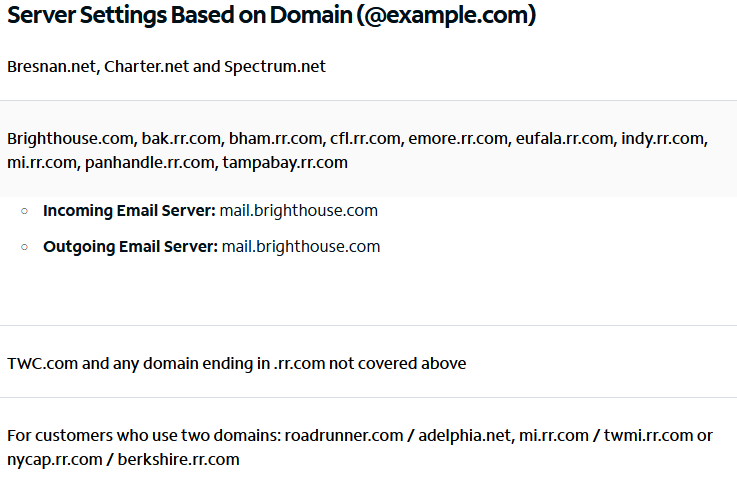
1. What app are you using on your phone? 2. Is your email address one of the legacy roadrunner ones? perhaps one that uses brighthouse servers
Are you using the spectrum service to connect to the internet? I have seen several issues of late where the problem is spectrum refuse to send mail unless you connect using an IP address they consider they issued. SO a VPN will automatically fail. Non spectrum hotspots will fail as will wifi in hotels and motels unless you luck out by being in a business that shares a provider with you. One chap was in Houston on business, suddenly he could not send mail.
Given the skills I am seeing of late from Spectum it is entirely possible they have blocked a larger swathe of their own users from sending mail via their own SMTP server because they have a skills issue. They do not apply the sending restriction to their webmail, only to sending via their SMTP server.
Goto this link https://whatismyipaddress.com/
3. Is your ISP given as Spectrum? 4. What is the IPV4 address given at that website?
I asked for four things. I got part of one and an assertion that may or may not be correct.
I will include a picture of the spectrum website where they describe which server top use. David linked to it way back in this topic.
zbadger said
Am using Spectrum internet and mobile with rr.com ending
So how does you response help with number three, I assume that is the item that is being responded to as I see no IP address or others details asked for. There is insufficient information in your response to categorically determine is you are in the first or second group of rr.com email addresses.
If you wish to decline to add information to help you that you are asked to supply, just say so. I will close this topic as without more information I am just guessing. The choice is yours.
I am sorry this sounds ignorant, but I do not know what you’re asking or where should I look for whatever you’re asking. For example, I’ve never heard of or seen the term brighthouse before. I know I am legacy Time Warner cable and have had the Thunderbird "wi.rr.com.com" Email address for decades. My Internet service provider is Spectrum.
Modified by zbadger

I am getting the same message when trying to send emails. And I have frontier, which is now yahoo, so it is not just a spectrum issue apparently. "Sending of the message failed. The message could not be sent because the connection to Outgoing server (SMTP) smtp.frontier.com was lost in the middle of the transaction. Try again."
I can receive emails, but I can not send them through thunderbird. If I log in directly to frontier/yahoo, I can send emails. I double checked all my settings and they are what they should be. This started maybe 3 or 4 days ago. Nothing is different, no VPN and I tried turning the firewall off and still the same result.
Lisa said
I am getting the same message when trying to send emails. And I have frontier, which is now yahoo, so it is not just a spectrum issue apparently. "Sending of the message failed. The message could not be sent because the connection to Outgoing server (SMTP) smtp.frontier.com was lost in the middle of the transaction. Try again." I can receive emails, but I can not send them through thunderbird. If I log in directly to frontier/yahoo, I can send emails. I double checked all my settings and they are what they should be. This started maybe 3 or 4 days ago. Nothing is different, no VPN and I tried turning the firewall off and still the same result.
The settings for Frontier/Yahoo:
incoming IMAP/POP server: imap.mail.yahoo.com/pop.mail.yahoo.com port: 993 for IMAP, 995 for POP security: SSL/TLS authentication: OAuth2 User Name: email address
outgoing SMTP server: smtp.mail.yahoo.com port: 465 security: SSL/TLS authentication: OAuth2 User Name: email address
sfhowes said
Lisa said
I am getting the same message when trying to send emails. And I have frontier, which is now yahoo, so it is not just a spectrum issue apparently. "Sending of the message failed. The message could not be sent because the connection to Outgoing server (SMTP) smtp.frontier.com was lost in the middle of the transaction. Try again." I can receive emails, but I can not send them through thunderbird. If I log in directly to frontier/yahoo, I can send emails. I double checked all my settings and they are what they should be. This started maybe 3 or 4 days ago. Nothing is different, no VPN and I tried turning the firewall off and still the same result.The settings for Frontier/Yahoo:
incoming IMAP/POP server: imap.mail.yahoo.com/pop.mail.yahoo.com port: 993 for IMAP, 995 for POP security: SSL/TLS authentication: OAuth2 User Name: email address
outgoing SMTP server: smtp.mail.yahoo.com port: 465 security: SSL/TLS authentication: OAuth2 User Name: email address
Everything is correct there. I don't have an option to select for OAuth2 for either in or outgoing.... I have it as normal password. We had issues years ago, and that's how it was setup and has been working for years.
Thank you for posting, Lisa. I'm sorry you're having this problem, but it goes to show that I'm not in isolation. I've had. Thunderbird with my Roadrunner account for decades and decades. And like you experienced. Last week all of a sudden I was no longer able to send out emails even though I'm able to receive them. And like you, I was able to send them out if I wanted to use (which I don't) spectrum. Web mail. And like you, I had the correct settings for my outgoing server. So at least two of us now I’ve had this problem and hopefully someone in the Thunderbird community can come up with a solution.
zbadger said
Thank you for posting, Lisa. I'm sorry you're having this problem, but it goes to show that I'm not in isolation. I've had. Thunderbird with my Roadrunner account for decades and decades. And like you experienced. Last week all of a sudden I was no longer able to send out emails even though I'm able to receive them. And like you, I was able to send them out if I wanted to use (which I don't) spectrum. Web mail. And like you, I had the correct settings for my outgoing server. So at least two of us now I’ve had this problem and hopefully someone in the Thunderbird community can come up with a solution.
Same here, I have had it setup for a long time as well. My last thunderbird update was Jan 30th... when was yours? I checked for updates on thunderbird and made sure everything else is up to date as well. Still not able to send emails today. I was hoping to wake up and magically it would start working just like it magically stopped working. Grrrrrr
Lisa said
Everything is correct there. I don't have an option to select for OAuth2 for either in or outgoing.... I have it as normal password. We had issues years ago, and that's how it was setup and has been working for years.
If OAuth2 isn't in the menu for the yahoo servers, there's something wrong with your setup. There is a way to force OAuth2 through Config. editor, but if you keep the authentication as 'normal password', the alternative is to use an app password, created on the Yahoo site, in place of the account password.
sfhowes said
Lisa said
Everything is correct there. I don't have an option to select for OAuth2 for either in or outgoing.... I have it as normal password. We had issues years ago, and that's how it was setup and has been working for years.If OAuth2 isn't in the menu for the yahoo servers, there's something wrong with your setup. There is a way to force OAuth2 through Config. editor, but if you keep the authentication as 'normal password', the alternative is to use an app password, created on the Yahoo site, in place of the account password.
I looked back in the settings and it has 2 options for the server identities. One being a frontier one, and one being a yahoo one. I changed it the other one and that one has the OAuth2 option and I did that. Still can not send emails but I can receive them. Why out of nowhere can it just stop working if you didn't change a thing? And its obviously not just a yahoo/ frontier or spectrum issue if more than one of us is having the same issue.
To the Thunderbird community. Just like Lisa, although she uses a different provider, I still cannot send out emails on Thunderbird. all of a sudden it stopped working on both a laptop and on my phone I’ve had this email address for many decades help please
zbadger said
To the Thunderbird community. Just like Lisa, although she uses a different provider, I still cannot send out emails on Thunderbird. all of a sudden it stopped working on both a laptop and on my phone I’ve had this email address for many decades help please
For a @wi.rr.com address, the smtp settings are mail.twc.com, 587, STARTTLS, normal password, email address.
Run your laptop in Windows or OS X safe mode and see if sending works. As mentioned already, if both the phone and laptop aren't sending, it suggests an external (to TB) factor is causing the issue.
Thank you for your response. Unfortunately I'm going in circles. First of all, I did. Try safe mode and it did not make a difference. With my laptop. I called Spectrum again and they said that the authentication should be SSL. Not the one you mentioned. But I tried both and it still didn't matter. They insist that since I can send out emails through spectrum.net. that it is a Thunderbird issue. I believe it is because Spectrum has tried to change everyone to spectrum.net but that doesn’t help me at this point going directly to Mozilla Thunderbird.