


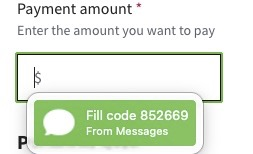
Is "Fill Code ###### from Messages" from Firefox?

A mouseover dialog box recently began to appear over formfields in Mozilla. I don't know 'which browser process 'it's coming from. Possibilities include Firefox for Tahoe, Apple Messages, and the Lastpass extension for Firefox. Maybe even Tahoe itself, who knows.
I don't think it's Lastpass because it covers the Lastpass fill prompt ON EVERY FIELD on the browser page.
Note to developers: Dialog boxes always need to show a source LOL.
(Yep, shared the TFA code! )
A mouseover dialog box recently began to appear over formfields in Mozilla. I don't know ''''which browser process ''''it's coming from. Possibilities include Firefox for Tahoe, Apple Messages, and the Lastpass extension for Firefox. Maybe even Tahoe itself, who knows.
I don't think it's Lastpass because it covers the Lastpass fill prompt ON EVERY FIELD on the browser page.
Note to developers: Dialog boxes always need to show a source LOL.
(Yep, shared the TFA code! )
All Replies (2)
Start Firefox in Troubleshoot Mode to check if one of the extensions ("3-bar" menu button or Tools -> Add-ons -> Extensions) or if hardware acceleration or if userChrome.css/userContent.css is causing the problem.
- switch to the Default System theme: "3-bar" menu button or Tools -> Add-ons -> Themes
- do NOT click "Refresh Firefox" in the Troubleshoot Mode start window