


I can open outlook on chrome and explorer but Firefox suddenly, after 2 years, has no program to open outlook.Outlook
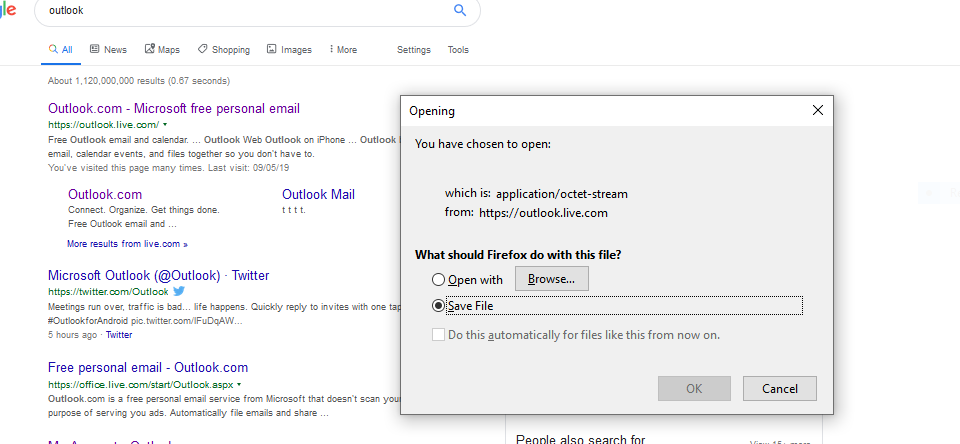
I can use firefox to browse any other sites, but when I ask to go to Outlook, after 2 years of doing this daily, it says it has no program to open it. It feels like it is stuck in some cycle. The only thing I can think of doing was downloading photos the day before and mailing them out directly. Outlook is working fine on chrome so it is a firefox/outlook problem. Any suggestions?
All Replies (5)
That's strange!!
How about a link to the inbox folder -- does this work?
https://outlook.live.com/mail/inbox
Also, your Firefox identified as either Beta or Developer Edition (Firefox 69). Those versions do get frequent changes, so keep an eye out for other reports of a new issue.
Thanks but no help. Did you see the message I get on the screenshot I attached to the post. It makes no sense. I wish firefox themselves could advise why I am getting that.
There's not a good explanation for why a web page from live.com should come with headers indicating it is a binary file (application/octet-stream) instead of HTML.
Have you already ruled out extensions as a potential culprit? You could test in Firefox's Safe Mode. In its Safe Mode, Firefox temporarily deactivates extensions, hardware acceleration, any userChrome.css/userContent.css files, and some other advanced features to help you assess whether these are causing the problem.
If Firefox is not running: Hold down the Shift key when starting Firefox. (On Mac, hold down the option/alt key instead of the Shift key.)
If Firefox is running: You can restart Firefox in Safe Mode using either:
- "3-bar" menu button > "?" Help button > Restart with Add-ons Disabled
- (menu bar) Help menu > Restart with Add-ons Disabled
and OK the restart.
Both scenarios: A small dialog should appear. Click "Start in Safe Mode" (not Refresh).
Any improvement?
Just tried safe opening of Firefox but still no joy with Outlook. As I said, Firefox is opening all other files.
I would expect more reports if it were caused by popular security software like Avast, AVG, Bitdefender, ESET, or Kaspersky, but do you use any of those -- or others -- that filter your browsing before it reaches Firefox?