


When I click on a link for an e-mail MS outlook dosen't open. It works in Chrome and IE. When i go to the optiions / programs mail to dosen't show up as an opt

When I am browsing on a web site and I click on an e-mail address that should open Outlook it dose not. it doesn't do any thing. I have tried this in safe mode and still nothing, I have also looked in the options / programs to see what program mail to has assocated with it but there is no mail to showing
the links work with Chrome and IE
Zvolené řešení
Resting firefox fixed it thanks
Všechny odpovědi (3)
Try Firefox Safe Mode to see if the problem goes away. Safe Mode is a troubleshooting mode, which disables most add-ons.
(If you're not using it, switch to the Default theme.)
- You can open Firefox 4.0+ in Safe Mode by holding the Shift key when you open the Firefox desktop or Start menu shortcut.
- Or open the Help menu and click on the Restart with Add-ons Disabled... menu item while Firefox is running.
Once you get the pop-up, just select "'Start in Safe Mode"
If the issue is not present in Firefox Safe Mode, your problem is probably caused by an extension, and you need to figure out which one. Please follow the Troubleshoot extensions, themes and hardware acceleration issues to solve common Firefox problems article for that.
To exit the Firefox Safe Mode, just close Firefox and wait a few seconds before opening Firefox for normal use again.
Please report back soon.
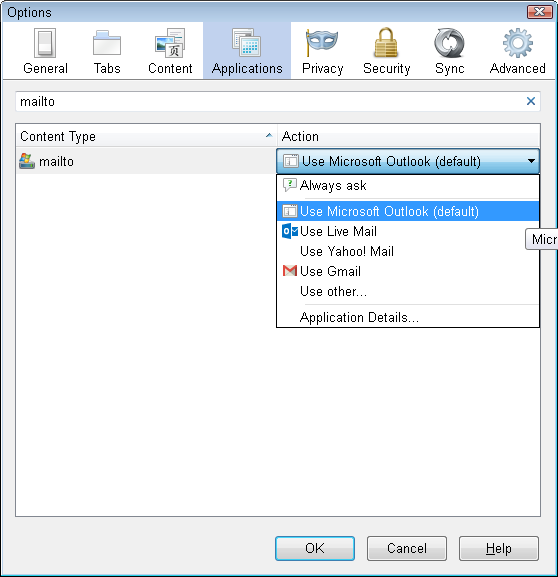
In case you didn't find it, this article describes how to assign Outlook to handle mailto links: Change the program used to open email links. Note that mailto is written without a space in this case.
If mailto is missing, it can indicate that one of Firefox's settings files has become corrupted. You can rename that file so Firefox regenerates it. Here's how:
Open your current Firefox settings (AKA Firefox profile) folder using
Help > Troubleshooting Information > "Show Folder" button
Switch back to Firefox and Exit
Pause while Firefox finishes its cleanup, then rename mimeTypes.rdf to something like mimeTypes.old
Restart Firefox. Hopefully now you can set your mailto preference.
Upravil uživatel jscher2000 - Support Volunteer dne
Zvolené řešení
Resting firefox fixed it thanks