


Some websites images won't load on firefox

Whenever I need to access https://ezbuy.sg I have to switch to Google Chrome or MS Edge because most of the images will not load. Clearing cache % cookies, Safe mode or Private Window will see the same problem.
すべての返信 (6)

Make sure you are not blocking content.
Start Firefox in Safe Mode {web link}
A small dialog should appear. Click Start In Safe Mode (not Refresh). Is the problem still there?
https://support.mozilla.org/en-US/kb/enhanced-tracking-protection-firefox-desktop
Many site issues can be caused by corrupt cookies or cache.
Warning ! ! This will log you out of sites you're logged in to. You may also lose any settings for that website.
- How to clear the Firefox cache {web link}acking-protection-firefox-desktop
Before I seek help here, I had tried the following:- 1. Clearing cache & cookies 2. Use Private Window. 3. Disabled Add-on one by one. 4. Start Firefox in Safe mode. All the above did not solve the image loading problem on https://ezbuy.sg, most of the images just won't load when I scroll down. Google Chrome does not have this problem.
FredMcD said
Make sure you are not blocking content. Start Firefox in Safe Mode {web link} A small dialog should appear. Click Start In Safe Mode (not Refresh). Is the problem still there?
https://support.mozilla.org/en-US/kb/enhanced-tracking-protection-firefox-desktop
Many site issues can be caused by corrupt cookies or cache.Warning ! ! This will log you out of sites you're logged in to. You may also lose any settings for that website.
- How to clear the Firefox cache {web link}acking-protection-firefox-desktop
Before I seek help here, I had tried the following:- 1. Clearing cache & cookies 2. Use Private Window. 3. Disabled Add-on one by one. 4. Start Firefox in Safe mode. All the above did not solve the image loading problem on https://ezbuy.sg, most of the images just won't load when I scroll down. Google Chrome does not have this problem.
Start your Computer in safe mode with network support. Then start Firefox. Try Secure websites. Is the problem still there?
http://encyclopedia2.thefreedictionary.com/Linux+Safe+Mode Starting Any Computer In Safe Mode; Free Online Encyclopedia
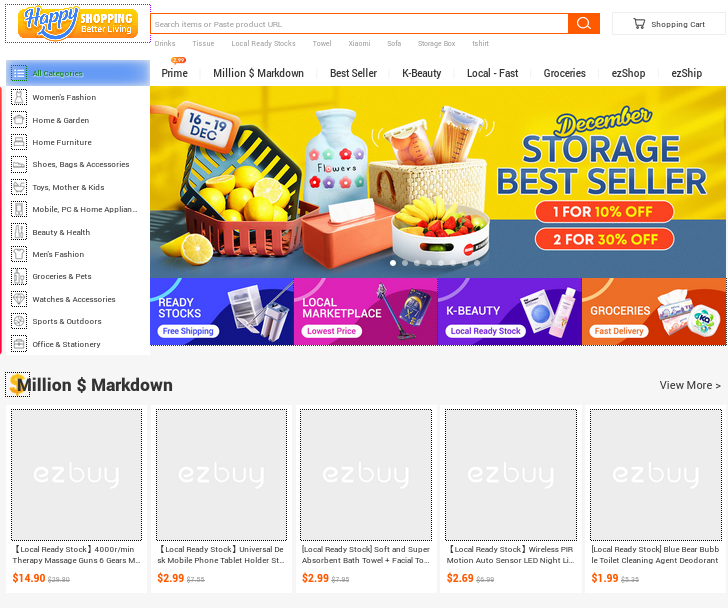
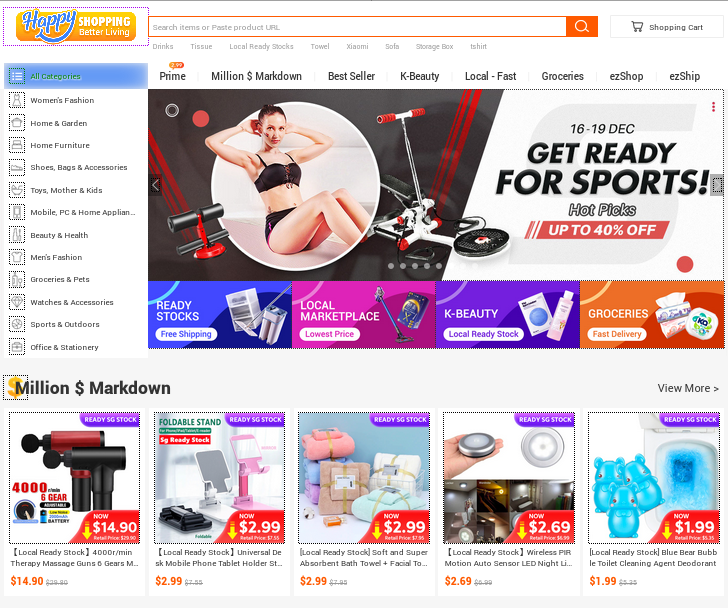
I only see placeholder images and not images that you would expect if you check the image in the Inspector (opening the image src link works). I don't know why they do not appear. It looks that lazy loading isn't working for some reason and that you are left with placeholder images.
I tried a JavaScript bookmarkklet to reload images and that works more or less (I need to use this bookmarklet more than once).
javascript:var frRlImg=function(oFrame){if(!oFrame){oFrame=window;}for(var x=0,y,z=(new Date()).getTime();y=oFrame.document.images[x];x++){y.src=y.src+((y.src.indexOf('?')+1)?'&':'?')+z;}for(var x=0,y=oFrame.frames;y[x];x++){frRlImg(y[x]);}};frRlImg();
この投稿は cor-el により に変更されました
FredMcD said
Start your Computer in safe mode with network support. Then start Firefox. Try Secure websites. Is the problem still there? http://encyclopedia2.thefreedictionary.com/Linux+Safe+Mode Starting Any Computer In Safe Mode; Free Online Encyclopedia
Thank you for your advice. I do not have this problem when using Google Chrome, MS Edge or MS IE. Did you try to open https://ezbuy.sg/ using Firefox?
cor-el said
I only see placeholder images and not images that you would expect if you check the image in the Inspector (opening the image src link works).
I don't know why they do not appear.
It looks that lazy loading isn't working for some reason and that you are left with placeholder images.
I tried a JavaScript bookmarkklet to reload images and that works more or less (I need to use this bookmarklet more than once).
javascript:var frRlImg=function(oFrame){if(!oFrame){oFrame=window;}for(var x=0,y,z=(new Date()).getTime();y=oFrame.document.images[x];x++){y.src=y.src+((y.src.indexOf('?')+1)?'&':'?')+z;}for(var x=0,y=oFrame.frames;y[x];x++){frRlImg(y[x]);}};frRlImg();
Thank you for your help. I guess this could be a bug in Firefox as I do not have this problem when using Google Chrome, MS edge or MS IE.