


MSN games will not work in Firefox - work perfectly in explorer

MSN games (mahjongg, cubis, etc) will not work in Firefox but work perfectly in Explorer. It is aggravating to have to switch to Explorer just to game as I use Firefox for everything else. Games gets to loading stage then just runs and runs but won't load.
すべての返信 (1)
You can try these steps in case of issues with web pages: You can reload web page(s) and bypass the cache to refresh possibly outdated or corrupted files. Hold down the Shift key and left-click the Reload button or press 'Ctrl + F5' or press 'Ctrl + Shift + R'
Another thing to try :
Clear the cache and cookies only from websites that cause problems.
Clear the Cache:
3-bar menu => Options => Advanced => Network => Cached Web Content :
"Clear Now"
Remove Cookies from sites causing problems:
3-bar menu => Options => Privacy => Cookies : "Show Cookies"
If the above doesn't do the trick, then let's try Firefox in Safe Mode : If Firefox is not running : Hold down the Shift key when starting Firefox. If Firefox is running : 3-bar menu => ' ? ' (at the bottom of the dropdown) => 'Restart with Add-ons disabled'. Then OK the restart. A small dialog should appear. Click 'Start in Safe Mode' ( not 'Refresh' !)
See : https://support.mozilla.org/en-US/kb/troubleshoot-firefox-issues-using-safe-mode
Try disabling graphics hardware acceleration in Firefox. Since this feature was added to Firefox it has gradually improved but there are still a few glitches.
You will need to restart Firefox for this to take effect so save all work first (e.g., mail you are composing, online documents you're editing, etc.,) and then perform these steps:
- Click the menu button
 and select Options (Windows) or Preferences (Mac, Linux).
- Select the General panel.
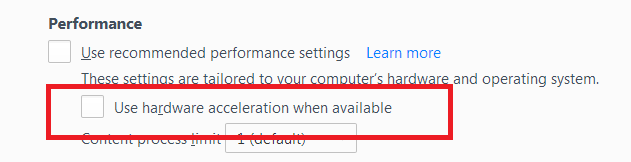
- Under Performance, uncheck Use recommended performance settings. Additional settings will be displayed.
- Uncheck Use hardware acceleration when available.
- Close Firefox completely and then restart Firefox to see if the problem persists.
If the problem is resolved, you should check for updates for your graphics driver by following the steps mentioned in these Knowledge base articles: