


Can't sync my data from my mobile to my desktop

I re-installed my firefox on my PC, and tried to sync my data back to it from my Android device. The data won't sync because of a wrong recovery key. I have my recovery key and I know its the right one. How can I move my data from my Android device to my PC safely.
Tutte le risposte (16)
hello, on your android device, go into the systems settings app > accounts & synchronisation > firefox sync > pair device. then on your desktop go to firefox > options > sync > set up firefox sync > i have an account, enter the 3x4 digit code that is displayed into your android device and finish the steps in order to pair the two devices.
Thanks for your response. I think I screwed things up before do that. I Right now my PC won't sync (copy) contents of my Android device, and it says sync encountered an error. I must have changed the "key" associated with my account by trying to log in with my email from the browser.
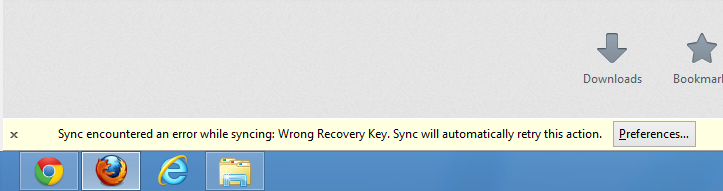
can you try to unlink the desktop version from the account again under firefox > options > sync & then perform the steps i've described in my first answer again?
I already tried this, even installed firefox on a different PC and tried to sync, same result. It appears my device and PC recognize different keys, if that were possible.
The problem is still unsolved. Are there any more suggestions? Thank you.
you could try to reset the sync account, like it is described here: Replace your Sync information - however, beware that this will mean loss of data that is stored on the sync servers, so you'd then rely on the data that is stored within the firefox profile on your android phone only...
Is it then possible to have the data on the Android device to sync to the sync server?
i feel uneasy answering that - in principle that is how it's supposed to work, but there always seem to be some quirks when it comes to sync...
Thanks for your help all the way
You can look at this version of the about:synckey extension that I have modified to show the sync key in current Firefox versions (desktop and mobile).
You can download this Firefox extension file without having to register and sign on to this website by clicking the "Download This File" button.
I tried to download and install but won't work. I also followed the link to the webpage but it says not updated for version 22.0.
I hadn't checked the extension lately and it apparently got broken.
I've uploaded a corrected version under the same name that should be working.
Components.utils.import("resource://services-sync/main.js");
Weave.Utils.hyphenatePassphrase(Weave.Service.identity.syncKey);
The file didn't open on my mobile device, I use a Nexus 4.
Do you mean that you got an error when installing?
You need to type about:synckey to display the page with the sync key and providing that sync is installed properly, you should see the sync key.
i having a local area connecting system. if anybody can easily access my system. because i am having lot of data. somebody can stole how can i identify . or they access easily or not. for example facebook chat to my friend .if they are identify or not.please help me .

I tried to install the xpi file in Android Firefox but I cannot even open the xpi type file in my Firefox. Mobile Firefox doesn't even know to open it. :/