


I - the Sender - has been Blacklisted. How do I un-Blacklist myself?

Hello How do I un-Blacklist myself?
I- the Sender - has been Blacklisted. I can't send out Emails because of this. I can't even upload a screenshot of the message I got about this.
I use a Windows 10 Desktop.
Regards, Catherine
Soluzione scelta
It was my pleasure to assist. You are most welcome. :)
Tutte le risposte (5)
PS - Did manage to upload image of message I got when I was 'sender blacklisted'.
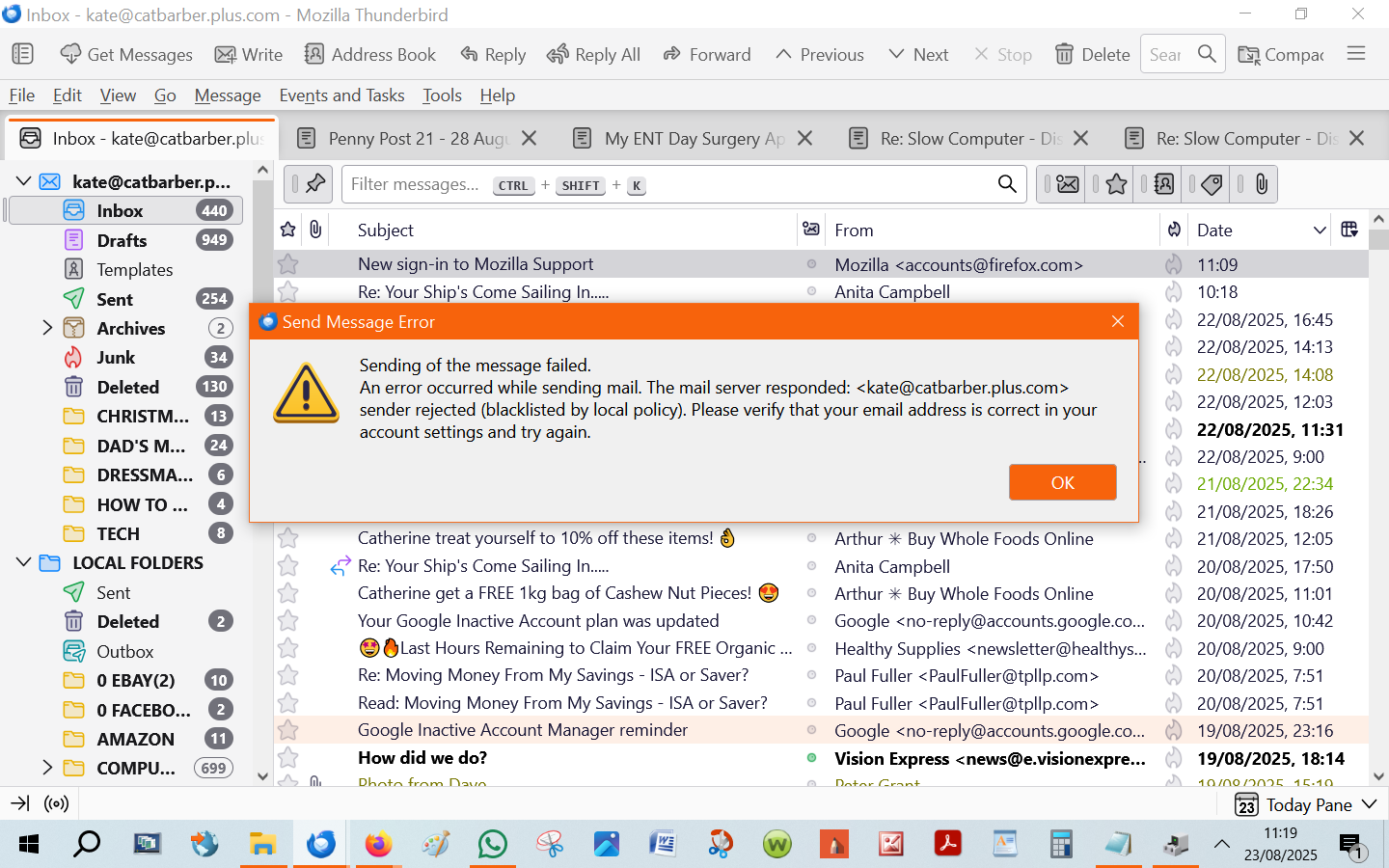
'Local policy' indicates this is being done by your email provider. I suggest contacting them
Thanks so much David!
Presumably 'email provider' means my Internet Provider which is Plusnet?
I'll get on to them, and hope to let you know the outcome.
Well, I contacted Plusnet, asking why had I been blacklisted. Since then, the problem seems to have just gone away - I've been able to send emails that were being recieved by the recipient, as they replied back to me. Thanks again David for the suggestion!
Soluzione scelta
It was my pleasure to assist. You are most welcome. :)