


Windows 10 reached EOS (end of support) on October 14, 2025. If you are on Windows 10, see this article.

Cerca nel supporto

Attenzione alle mail truffa. Mozilla non chiederà mai di chiamare o mandare messaggi a un numero di telefono o di inviare dati personali. Segnalare qualsiasi attività sospetta utilizzando l'opzione “Segnala abuso”.

Ulteriori informazioni
Questa discussione è chiusa e archiviata. Inserire una nuova richiesta se occorre aiuto.
Bloccata Archiviato

Push Notification does not close after 5 second viewing

TechHorse risposto
SuMo Bot

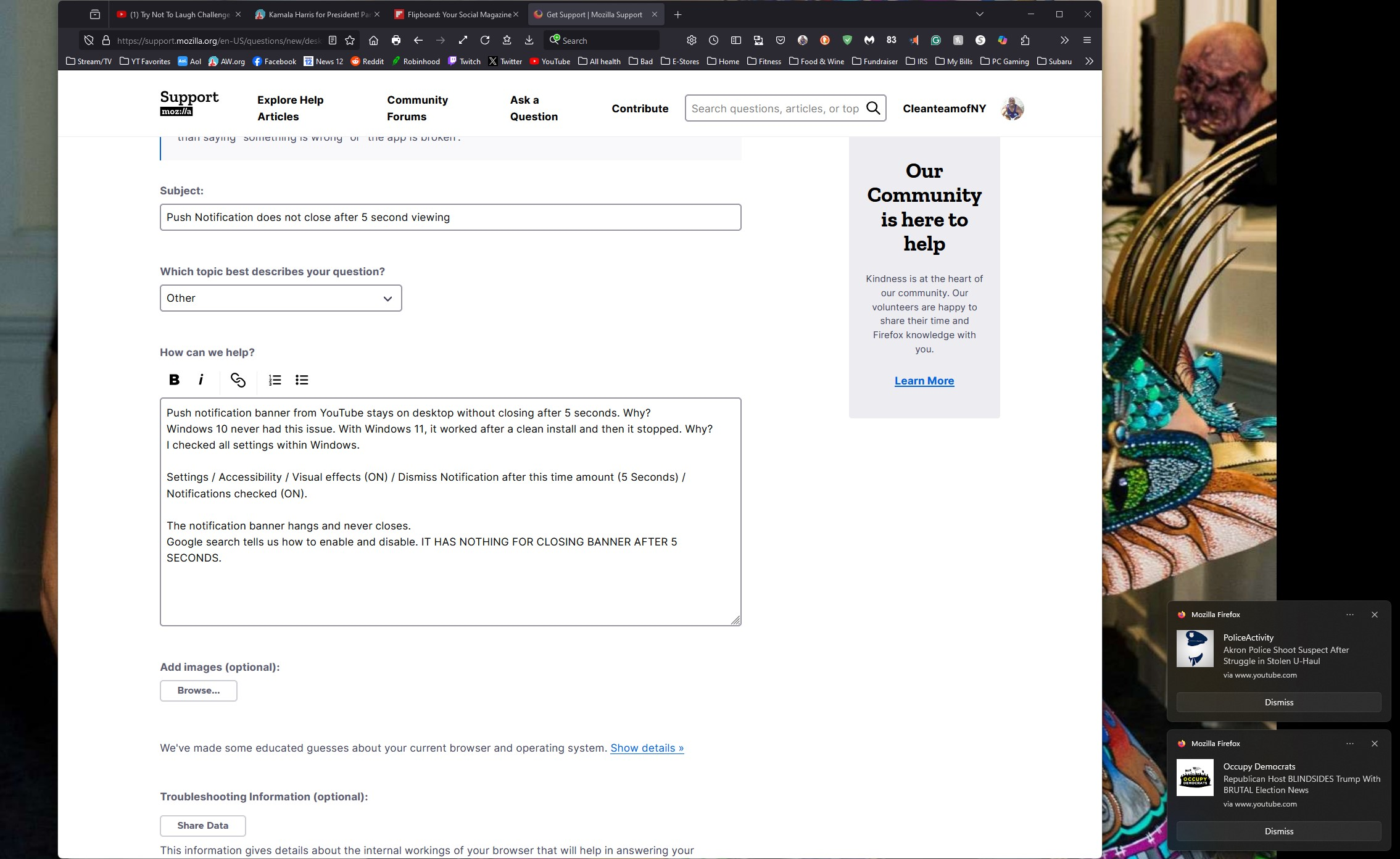
Push notification banner from YouTube stays on desktop without closing after 5 seconds. Why? Windows 10 never had this issue. With Windows 11, it worked after a clean install and then it stopped. Why? I checked all settings within Windows.

Settings / Accessibility / Visual effects (ON) / Dismiss Notification after this time amount (5 Seconds) / Notifications checked (ON).

The notification banner hangs and never closes. Google search tells us how to enable and disable. IT HAS NOTHING FOR CLOSING BANNER AFTER 5 SECONDS.
Push notification banner from YouTube stays on desktop without closing after 5 seconds. Why? Windows 10 never had this issue. With Windows 11, it worked after a clean install and then it stopped. Why? I checked all settings within Windows. Settings / Accessibility / Visual effects (ON) / Dismiss Notification after this time amount (5 Seconds) / Notifications checked (ON). The notification banner hangs and never closes. Google search tells us how to enable and disable. IT HAS NOTHING FOR CLOSING BANNER AFTER 5 SECONDS.

Tutte le risposte (1)

CleanteamofNY, do other system notifications close after 5 seconds?

Have you tried the old method of changing a setting to something else and then changing it back?

For example, you could change the timeout to 15 seconds, test to see if the Firefox notifications now respect this new setting, and if they do, then go and set the notification timeout back to 5 seconds.

(Not sure if this is necessary, but you may possibly need to close both the Settings app and Firefox after each change, in order for the new timeout setting to take effect with Firefox?)

Modificato da TechHorse il

This question has been locked because the original author has deleted their account. While you can no longer post new replies, the existing content remains available for reference.