


update disabled in linux mint by "administrator"

Hi, I can see update disabled info as shown on the screenshot. How to enable it? Thanks in advance! Regards, Sulhan
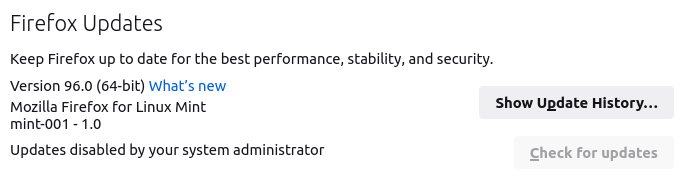
Soluzione scelta
This is mentioned in a recent Mint blog post:
https://blog.linuxmint.com/?p=4244
Leggere questa risposta nel contesto 👍 1Tutte le risposte (4)
What do you see here? https://support.mozilla.org/en-US/kb/see-active-policies-firefox-enterprise
Also, try downloading another copy of Firefox and run it from the folder. It's good to have a separate version for testing these kinds of issues. https://www.mozilla.org/en-US/firefox/all/#product-desktop-release
Mozilla only provides internal Firefox updates for the official builds of desktop Firefox (for Linux, Windows and macOS) from https://www.mozilla.org/firefox/all/
Third-party builds like those installed from a package repository for a Linux distro do not get internal Firefox updates.
In this case it looks like you have Firefox from the Mozilla server and a version from the Linux distro and that updates have been disabled by a system wide policy or autoconfig file. The about:policies page should confirm that a policy that disables updates is active.
Soluzione scelta
This is mentioned in a recent Mint blog post: