


Windows 10 reached EOS (end of support) on October 14, 2025. If you are on Windows 10, see this article.

Cerca nel supporto

Attenzione alle mail truffa. Mozilla non chiederà mai di chiamare o mandare messaggi a un numero di telefono o di inviare dati personali. Segnalare qualsiasi attività sospetta utilizzando l'opzione “Segnala abuso”.

Ulteriori informazioni
Questa discussione è chiusa e archiviata. Inserire una nuova richiesta se occorre aiuto.
Bloccata Archiviato

Bookmark colors in FF91

jscher2000 -... risposto
Norbert38

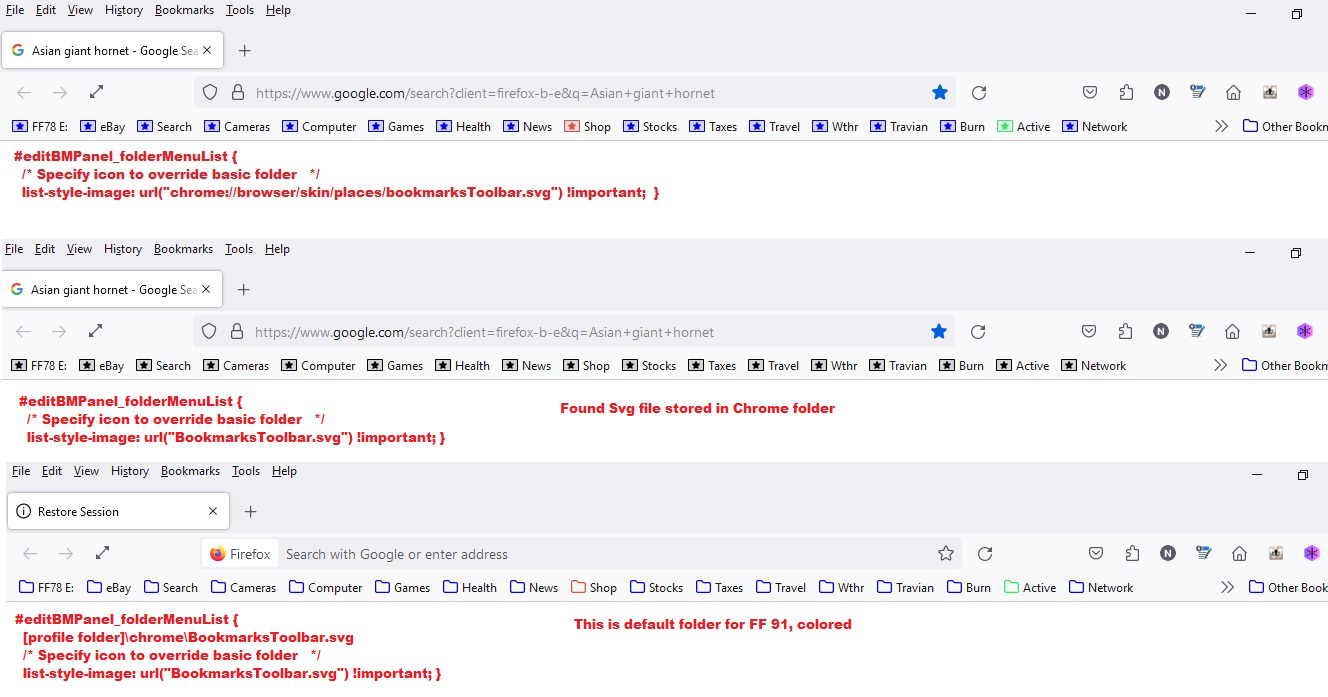
Only able to color SVG files in omni.ja NOT SVG files extracted from omni.ja and saved to a local directory

BookmarksToolbar.svg is in the chrome directory along with userChrome.css. See code below

<per>

/* Colored folders for Bookmark Menus. */ /* Standard folder -- on Toolbar and Menus */

  1. PlacesToolbarItems toolbarbutton[container="true"]:not([query="true"]) .toolbarbutton-icon,
-moz-any(
  1. PlacesToolbarItems,
  2. PlacesChevronPopup,
  3. BMB_bookmarksPopup,
  4. bookmarksMenu,
  5. OtherBookmarksPopup) menu[container="true"]:not([query="true"]) > .menu-iconic-left > .menu-iconic-icon,

/* Standard folder -- in Sidebar, Library, Add/Edit Bookmark dialog */

-moz-any(
  1. bookmarks-view,
  2. editBMPanel_folderTree,
  3. placesList,
  4. placeContent) treechildren::-moz-tree-image(container),
  5. editBMPanel_folderMenuList > .menulist-label-box > .menulist-icon,
  6. editBMPanel_folderMenuList menupopup menuitem,
  7. editBMPanel_folderMenuList {
 [profile folder]\chrome\BookmarksToolbar.svg 
 /* Specify icon to override basic folder   */
 list-style-image: url("BookmarksToolbar.svg") !important; } 

/* One line fix This colours all bookmarks */

.bookmark-item[container], treechildren::-moz-tree-image(container) { fill: Blue    !important; }

/* Make Shop folder Red */ toolbarbutton.bookmark-item[label="Shop"] > .toolbarbutton-icon { fill: #e74c3c !important; }

/* Make Active folder Green */ toolbarbutton.bookmark-item[label="Active"] > .toolbarbutton-icon { fill: #3CE770 !important; }

<per>
Only able to color SVG files in omni.ja NOT SVG files extracted from omni.ja and saved to a local directory BookmarksToolbar.svg is in the chrome directory along with userChrome.css. See code below <per> /* Colored folders for Bookmark Menus. */ /* Standard folder -- on Toolbar and Menus */ #PlacesToolbarItems toolbarbutton[container="true"]:not([query="true"]) .toolbarbutton-icon, :-moz-any( #PlacesToolbarItems, #PlacesChevronPopup, #BMB_bookmarksPopup, #bookmarksMenu, #OtherBookmarksPopup) menu[container="true"]:not([query="true"]) > .menu-iconic-left > .menu-iconic-icon, /* Standard folder -- in Sidebar, Library, Add/Edit Bookmark dialog */ :-moz-any( #bookmarks-view, #editBMPanel_folderTree, #placesList, #placeContent) treechildren::-moz-tree-image(container), #editBMPanel_folderMenuList > .menulist-label-box > .menulist-icon, #editBMPanel_folderMenuList menupopup menuitem, #editBMPanel_folderMenuList { [profile folder]\chrome\BookmarksToolbar.svg /* Specify icon to override basic folder */ list-style-image: url("BookmarksToolbar.svg") !important; } /* One line fix This colours all bookmarks */ .bookmark-item[container], treechildren::-moz-tree-image(container) { fill: Blue !important; } /* Make Shop folder Red */ toolbarbutton.bookmark-item[label="Shop"] > .toolbarbutton-icon { fill: #e74c3c !important; } /* Make Active folder Green */ toolbarbutton.bookmark-item[label="Active"] > .toolbarbutton-icon { fill: #3CE770 !important; } <per>
Immagini allegate

Tutte le risposte (1)

Hi, those tags are <pre> and </pre> (pre being short for preformatted).

Norbert38 said

Only able to color SVG files in omni.ja NOT SVG files extracted from omni.ja and saved to a local directory

I think it would be best to continue in your established thread: https://support.mozilla.org/questions/1351058