Need help with my userChrome.css and window controls

I'm trying to get Firefox to obey my window control order. For me, the window controls are on the left with the order of Close, Maximize, Minimize. But Firefox does not like that and puts it like macOS with Close, Minimize, Maximize.
So I got this going
#TabsToolbar {
  direction: ltr;
}

#tabbrowser-tabs {
  direction: ltr;
}

.titlebar-buttonbox {
  display: flex;
}

.titlebar-min {
  order: 2;
}

.titlebar-max {
  order: 1;
}
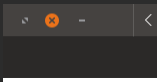
And it works well. But here is the problem, when the window becomes Maximized, the order changes to Maximize, Close, Minimize, as seen here in the photo. Anyone got some advice?
Modificato da cor-el il
Tutte le risposte (4)
I am unable to edit my comment, but I didn't paste the proper userChrome.css file
This is the code I am actually playing with:
- tabbrowser-tabs {
direction: ltr;
}
.titlebar-buttonbox {
display: flex;
}
.titlebar-min {
order: 3;
}
.titlebar-max {
order: 2;
} .titlebar-close {
order: 1;
}
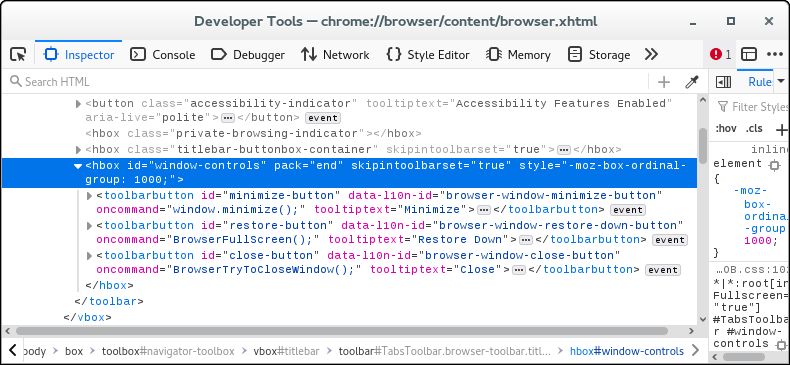
In full screen mode you do not use .titlebar-buttonbox (.titlebar-buttonbox-container), but you use #window-controls.
#TabsToolbar[inFullscreen] #window-controls
Modificato da cor-el il
cor-el said
In full screen mode you do not use .titlebar-buttonbox (.titlebar-buttonbox-container), but you use #window-controls.#TabsToolbar[inFullscreen] #window-controls
Thank you. I tried this code but the same result happened:
- tabbrowser-tabs {
direction: ltr;
}
.titlebar-buttonbox {
display: flex;
}
.titlebar-min {
order: 3;
}
.titlebar-max {
order: 2;
} .titlebar-close {
order: 1;
}
- TabsToolbar[inFullscreen] #window-controls {
direction: ltr;
}
.titlebar-buttonbox {
display: flex;
}
.titlebar-min {
order: 3;
}
.titlebar-max {
order: 2;
} .titlebar-close {
order: 1;
}
You need different selectors for the individual window-controls as you can see if you use the Browser Toolbox to inspect the controls.