


Windows 10 reached EOS (end of support) on October 14, 2025. If you are on Windows 10, see this article.

Cerca nel supporto

Attenzione alle mail truffa. Mozilla non chiederà mai di chiamare o mandare messaggi a un numero di telefono o di inviare dati personali. Segnalare qualsiasi attività sospetta utilizzando l'opzione “Segnala abuso”.

Ulteriori informazioni
Questa discussione è archiviata. Inserire una nuova richiesta se occorre aiuto.
Archiviato

"Ask to save logins" option won't remain selected no matter what I do

cor-el risposto
Milena

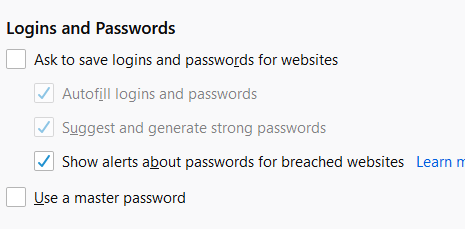
Hello, For some reason, the "ask to save logins" option is automatically unchecked every time I start a new Firefox session (despite all the following options being checked off. Please see attached picture for reference). I've already "refreshed" Firefox once, which I guess essentially reinstalls the browser. Any time I start a new browser session, I have to go into my privacy settings and manually check the "ask to save logins" option and then refresh so that the change is active. I don't know why but if this option remains unchecked, then my logins will not autofill despite this option being checked off. I'm not sure how to fix this or why it even started.
Hello, For some reason, the "ask to save logins" option is automatically unchecked every time I start a new Firefox session (despite all the following options being checked off. Please see attached picture for reference). I've already "refreshed" Firefox once, which I guess essentially reinstalls the browser. Any time I start a new browser session, I have to go into my privacy settings and manually check the "ask to save logins" option and then refresh so that the change is active. I don't know why but if this option remains unchecked, then my logins will not autofill despite this option being checked off. I'm not sure how to fix this or why it even started.
Immagini allegate

Tutte le risposte (1)

You can't have multiple Password Managers enabled at the same time, so if you have other password managers like RoboForm or Trend Micro Password Manager then the builtin Firefox Lockwise Password Manager will be disabled.