


Gah! your tab just crashed

Constant tab crashing.
Turning off Multi processing but then crashed whole Firefox. Updated graphics, Reset firefox, re-installed Firefox but still crashing.
Tab crashing is not giving any crash reports.

Soluzione scelta
Note: v55 has been giving users problems. Reinstall v54.
https://support.mozilla.org/en-US/kb/install-older-version-of-firefox?cache=no Be sure to read everything here.
If you still want to downgrade, look under; I still want to downgrade. Click the Directory of other versions and languages link. Look for the directory of the version that you want. But, remember that old versions may have security issues.
You should also check out Firefox; Extended Support Release {web link} ESR Notes System Requirements
Tutte le risposte (14)
What were you doing at the time? What type of web pages? Videos?
Start Firefox in Safe Mode {web link} by holding down the <Shift> (Mac=Options) key, and then starting Firefox.
A small dialog should appear. Click Start In Safe Mode (not Refresh). Is the problem still there?
It's has been crashing on any webpage that I am on. Mix of company pages which have no video to Facebook which crashes every few seconds.
I have started in Safe mode but the tabs still crash.
- Enter about:crashes in the Firefox address bar and press Enter. A Submitted Crash Reports list will appear, similar to the one shown below.
- Copy the 5 most recent Report IDs that start with bp- and then go back to your forum question and paste those IDs into the "Post a Reply" box.
Note: If a recent Report ID does not start with bp- click on it to submit the report.
Try disabling graphics hardware acceleration in Firefox. Since this feature was added to Firefox it has gradually improved but there are still a few glitches.
You will need to restart Firefox for this to take effect so save all work first (e.g., mail you are composing, online documents you're editing, etc.,) and then perform these steps:
In Firefox 54 and below:
- Click the menu button
 and select Options (Windows) or Preferences (Mac, Linux).
- Select the Advanced panel and the General tab.
- Uncheck Use hardware acceleration when available.
- Close Firefox completely and then restart Firefox to see if the problem persists.
In Firefox 55 and above:
- Click the menu button and select Options (Windows) or Preferences (Mac, Linux).
- Select the General panel.
- Under Performance, uncheck Use recommended performance settings. Additional settings will be displayed.
- Uncheck Use hardware acceleration when available.
- Close Firefox completely and then restart Firefox to see if the problem persists.
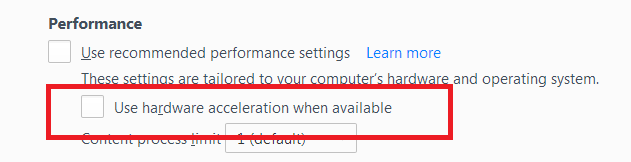
Did this fix your problems? Please report back to us!
If the problem is resolved, you should check for updates for your graphics driver by following the steps mentioned in these Knowledge base articles:
Thank you.
TyDraniu - I am unable to post any crash reports as Firefox doesnt seem to be producing them when it crashes
FredMcD - This has not solved the problem either. I have updated my graphics driver and have no extensions or themes running.
Try to disable multi-process tabs in Firefox. You can disable multi-process tabs in Firefox by setting the related prefs to false on the about:config page.
browser.tabs.remote.autostart = false browser.tabs.remote.autostart.2 = false
http://www.ghacks.net/2016/07/22/multi-process-firefox/
Type about:config<enter> in the address bar. If a warning screen comes up, press the Be Careful button. At the top of the screen is a search bar.
Thanks Fred but as I said in my first question, I have already tried this.
When I change both to false, the whole of Firefox crashes rather than just the tab.
In the address bar, type about:crashes<enter>. Note: If any reports do not have BP- in front of the numbers/letters, click it to submit them.
The crash report is several pages of data. We need the report numbers to see the whole report.
Using your mouse, mark the most recent 7 - 10 crash reports, and copy them. Now go to the reply box and paste them in.

For more help on crash reports, see; https://support.mozilla.org/en-US/kb/firefox-crashes-asking-support
Firefox does not seem to be creating crash reports when it crashes. The last ones were from 01/09. Also none of them BP infront and there is no option to submit
d620598c-0188-49c1-b954-621f5b11d4ff 01/09/2017 15:39 b1551448-b981-4478-aa43-af7465fa66e3 01/09/2017 13:30 90919950-3697-4b30-9d0f-35b741d9f08a 01/09/2017 13:30 33a1afc8-0a7e-4e30-b78e-5d4a62eb9de2 01/09/2017 13:30 a8ce95fd-3279-45b6-867c-0b8fc8ab3743 01/09/2017 13:30 e33a6314-3a8e-4217-a465-525982297dd0 01/09/2017 13:30 b64ba19a-75dc-4513-9377-41158a71c3c4 01/09/2017 13:29 faa17afa-e19d-4e4b-990b-281a0a2e87c4 01/09/2017 13:29 d7a89805-6917-47c0-927a-d7d756dc6620 01/09/2017 13:29
Soluzione scelta
Note: v55 has been giving users problems. Reinstall v54.
https://support.mozilla.org/en-US/kb/install-older-version-of-firefox?cache=no Be sure to read everything here.
If you still want to downgrade, look under; I still want to downgrade. Click the Directory of other versions and languages link. Look for the directory of the version that you want. But, remember that old versions may have security issues.
You should also check out Firefox; Extended Support Release {web link} ESR Notes System Requirements
Will give that a go. Thanks!
Reinstalling v54 has stopped the crashing
Glad to help. Safe Surfing.
find the fixed try this Firefox compatibility properties run this program in compatibility mode windows 8.