


Nvidia driver causes FF 54 and up to crash.

Every since I upgraded from FF 53.0.3 to 54.0.1, after lets say within 30 minutes FF will crash without generating any crash report. I looked in the Windows 7 (64-bit) event viewer and found the culprit. It is my Nvidia graphics driver that seems to be causing the problem (see event viewer image). I keep my Nvidia drivers current. The graphics card is a Geoforce 555M (mobile graphics card).
Has anyone had this kind of a problem and is there a fix/solution?
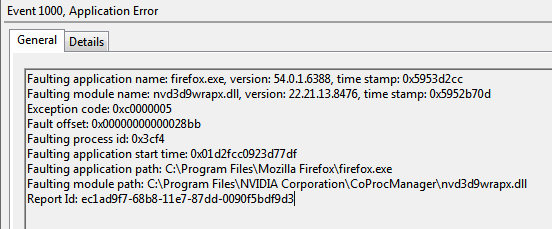
Modificato da mff55 il
Soluzione scelta
Hi, try turning off hardware acceleration - Upgrade your graphics drivers to use hardware acceleration and WebGL
If your question is resolved by this or another answer, please take a minute to let us know. Thank you!
Leggere questa risposta nel contesto 👍 0Tutte le risposte (5)
Did you try reinstalling the driver through device manager?
Last week I did update the Nvidia drivers (GT-555m) when I saw that they had a July update. But I still have the same problem with FF crashing.

Soluzione scelta
Hi, try turning off hardware acceleration - Upgrade your graphics drivers to use hardware acceleration and WebGL
If your question is resolved by this or another answer, please take a minute to let us know. Thank you!
In FF I turned off hardware acceleration and disabled WebGL as you recommended and so far FF has not crashed in nearly 4 hours. Before it would crash at random (5 minutes to 2 hours). I always leave FF open all the time. If by tomorrow it has not crashed, then I think the problem is solved. Will let you know tomorrow.
This morning Firefox is still up and running normally like it always has with no crashes. So turning off hardware acceleration and disabled WebGL has worked.
Thanks for the help Scribe :)