


Pic gone on youtube only sound

I have no picture on Youtube just sound. Have vision problems and can't fully read screen; something about icons. Win 10 is up to date ; (FireFox 95.0.2 just updated; also updated LibreOffice 7.2.4.1 win x64) both today then YouTube picture gone and the sound is OK
Wubrane rozrisanje
It appears you have an extension called "Youtube Audio Extension" installed. Try disabling it. 1. Type in about:addons in the address bar 2. Disable "Youtube Audio Extension" or something with a similar name 3. Go to the Youtube video again and check if the video plays
Tutu wotmołwu w konteksće čitać 👍 0Wšě wotmołwy (7)

OaksLSF said
. . . and can't fully read screen; something about icons.
Hello,
In order to better assist you with your issue please provide us with a screenshot. If you need help to create a screenshot, please see How do I create a screenshot of my problem?
Once you've done this, attach the saved screenshot file to your forum post by clicking the Browse... button below the Post your reply box. This will help us to visualize the problem.
Thank you!
Did this problem with the video just start? Can you tell when?
If you have Windows 10 N or KN then you may not have the Media Feature Pack installed. https://support.mozilla.org/en-US/kb/fix-video-audio-problems-firefox-windows
https://support.mozilla.org/en-US/kb/fix-problems-images-not-show
http://kb.mozillazine.org/Images_or_animations_do_not_load
https://support.mozilla.org/en-US/kb/fix-video-audio-problems-firefox-windows
https://support.mozilla.org/en-US/kb/fix-common-audio-and-video-issues
https://support.mozilla.org/en-US/kb/html5-audio-and-video-firefox
https://support.mozilla.org/en-US/kb/troubleshoot-issues-with-plugins-fix-problems
https://support.mozilla.org/en-US/kb/warning-unresponsive-plugin
Screenshot
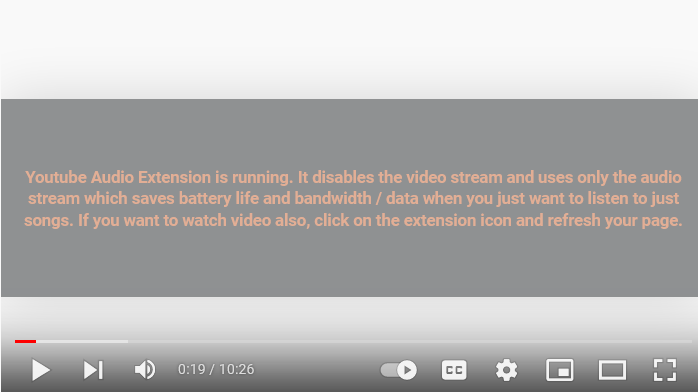
Just today I have vision problems and colour blind

Wubrane rozrisanje
It appears you have an extension called "Youtube Audio Extension" installed. Try disabling it. 1. Type in about:addons in the address bar 2. Disable "Youtube Audio Extension" or something with a similar name 3. Go to the Youtube video again and check if the video plays
thank you for your help
Problem solved
Well done both of you.