


Need to get a view where I see the webpage as presented by sender.

Some we pages [e.g., ConstantContact] only show as black and white with occasional blue. Thy have graphics and colors. How do I get their and other websites readable graphics and colors?
Όλες οι απαντήσεις (20)
I'm not sure I fully understand your question. If the problem is that image you know should be there are not showing, have you tried the steps in this article: Fix problems that cause images to not show.
Solved some of the problem [colors principally]. But some of the website text portions in banners and drop downs are so dark to black that I can't read.
Could you provide a link and indicate where you see the problem?
Some menus are rendered using Flash. Have you noticed any issues with Flash media?
In case it's relevant, Firefox does not always work well with WIndows' "High Contrast" themes. However, regular Aero and Basic themes should work.
Just found a pretty good example. Try www.celebritycruises.com
Make sure that you allow pages to choose their colors and that you haven't enabled High Contrast in the Accessibility settings.
- Tools > Options > Content : Fonts & Colors > Colors : [X] "Allow pages to choose their own colors, instead of my selections above"
Can you attach a screenshot?
- http://en.wikipedia.org/wiki/Screenshot
- https://support.mozilla.org/kb/how-do-i-create-screenshot-my-problem
Use a compressed image type like PNG or JPG to save the screenshot.
Make sure that you allow pages to choose their colors [did so] and that you haven't enabled High Contrast in the Accessibility settings.[where is this?]
See the linked article for the accessibility setting in Windows and check the color setting for Firefox in "Firefox or Tools > Options > Content > Colors"
See:
https://www4.citizensbankonline.com/efs/servlet/efs/default.jsp . This is a good example.
Can you attach a screenshot of how you see that page?
- http://en.wikipedia.org/wiki/Screenshot
- https://support.mozilla.org/kb/how-do-i-create-screenshot-my-problem
Use a compressed image type like PNG or JPG to save the screenshot.
Using Windows 7. Any idea how I would save a scrrenshot is you requested?
In Windows you can use the snipping tool or use Alt+PrintScreen to copy the active window to the clipboard.
I've snipped OK. How do I get it into a reply?'
It's now a .png on desktop.
Below the text box you should see an "attach" control to upload the image with your reply.
Edit: Actually, it was renamed "Add images" instead of Attach.
Τροποποιήθηκε στις από τον/την jscher2000 - Support Volunteer
Image is below. Note how unreadable top bars are . s o o o dark t black.
And thanks for educating the ignorant.
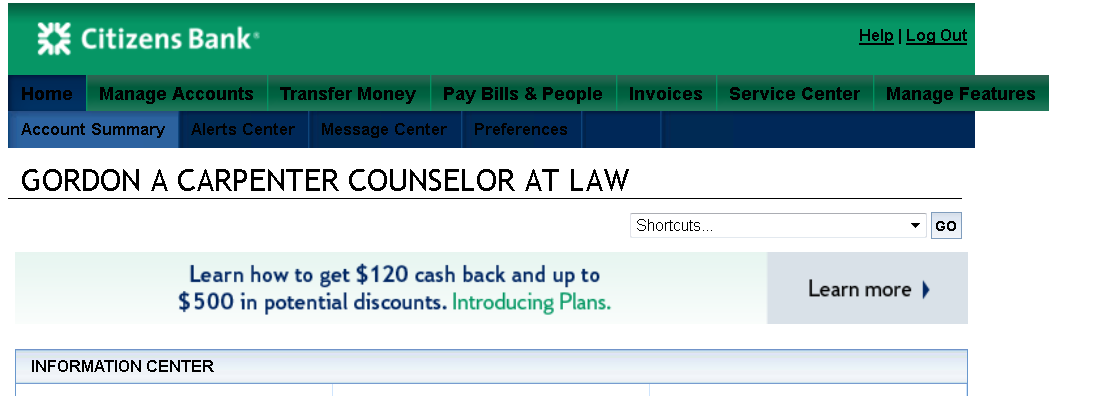
That bar should have white colors and not black as your screenshot shows.
Do you have any extensions that can change the page colors?
Start Firefox in Safe Mode to check if one of the extensions (Firefox/Tools > Add-ons > Extensions) or if hardware acceleration is causing the problem (switch to the DEFAULT theme: Firefox/Tools > Add-ons > Appearance).
- Do not click the Reset button on the Safe mode start window or otherwise make changes.
I can't view that particular page, but based on the home page, the text on those buttons should be pale, nearly white. (See attached.)
In case Firefox has a corrupted version of the style sheet in the cache, try bypassing it using Ctrl+Shift+r to reload the page fresh from the server. Any difference?
If that doesn't help, and noticing that the layout doesn't seem quite right either, I wonder whether some other setting or rule is altering the standard layout.

Will try. With mouse right clicks I only get momentary drop downs then gone -- no time to click anything. Any ideas about that? And how do I start Firefox in "safe mode"?
Ctrl shift r give only momentary relief. Kinda like the drop down right click problem above?
To restart in Safe Mode, you can use the item on the Help menu:
Help > Restart with add-ons disabled
or you can hold the Shift key when starting Firefox. (Only works if all Firefox windows are closed first...)