


PDF Editor issues in v146.0 64bit on windows 10 pro

I'm begining to regret installing v146.0!
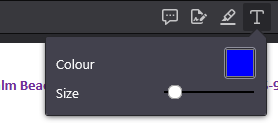
One of the most useful features of Firefox is the PDF editor and with this update, I've found that after annotating a PDF with several text boxes, clicking the text box icon (as shown in the attached screenshot) does absolutely nothing and it is impossible to enter any further text. The only way out of this is to refresh the pdf (after saving otherwise all changes will be lost) and then starting all over again only for the error to repeat itself making the editor almost unusable. Would really appreciate knowing how to work around this especially since to make my notes clearer, I change the color and the font size which is all lost everytime I have to refresh the PDF :-(
Incidentally, why are there so many updates? I prefer stable software that works rather than 'new features' that I never use!
Finally, Firefox used to have an amazing facility of making the Firefox private browser the default browser for Windows 10 but this was removed some years ago and can only be reinstated by changing registry keys. Everytime there's an update, these registry keys are overwritten :-(. Why was such a useful feature removed please?
Thanks in advance.
Όλες οι απαντήσεις (16)
Hi wotho,
Could you please try running Firefox in Troubleshoot Mode and see if the problem persists? I'm not sure what may have caused this, but let's rule out add-ons first.
Regarding the updates, you can consider switching to ESR, which receives major updates only once a year. For reference, see Choose a Firefox update channel.
Hi Denys,
Thanks very much for your reply.
I restarted my browser in safe mode and unfortunately, the issue happened again. I should have mentioned in my original post that I was annotating the PDF in a private window (which is what I've always done without any issues). Hopefully this information will help in resolving the issue.
I've noticed some other posts regarding similar issues with the PDF editor in v146.0 so others seem to have experienced the same issues.
Thank you for your helpful suggestion about the ESR. Are you aware if the PDF editing features are the same please?
Thanks again.
In order to isolate the issue, could you please try creating a new Firefox profile and check if the issue persists? (If you will have to use the legacy Profile Manager, remember to set your current profile as default again after creating a new one.)
If the issue persists, it's most likely a bug that should be reported on Bugzilla, Mozilla's bug tracker, and the developers will continue investigating.
If the issue doesn't persist, it may be caused by your current settings / corrupted files in your profile, and you (hopefully) will be able to move to the new profile with all your data.
I've tried it on another machine running windows 10 home (that I never used to edit PDFs in the past) in a private window and the same issue happened after entering 2 text boxes. Is this OK or do I still need to create a new profile?
I would still recommend creating a new profile, because I can't reproduce this issue.
Thank Denys. Do I need to close down firefox completely before running the test?
Just to reconfirm you carried out the following steps to reproduce the issue:
- Open a PDF in firefox private browsing
- Click on the text tool to annotate the pdf
- Click color to Change the color of font, click OK
- change the size of font
- Enter text in several text boxes in the document
- Click the text icon tool to close the text box dialog
- repeat above 2 steps several times until clicking the text icon no longer closes the text box dialog
- I then find that no further text can be entered nor the dialog closed until the pdf is refreshed clearing the color selected.
Thanks
You don't need to close Firefox, just open the new profile in a new window and try it there (if you want to try with Private Browsing, make sure to access it via the Firefox menu of that new window).
Unfortunately, I haven't been able to reproduce the issue following the given steps.
Thanks. My account menu doesn't seem to have a profiles option so I had to create it using about:profiles.
I created a new profile without shutting my firefox session, went into a private window of the new profile, carried out the steps and the issue recurred immediate on the first attempt!
I've just noticed that there are two profiles on my account default and default-release (which is the one in use). Is this normal and if not, could it be the problem?
It's completely expected, Firefox just works that way for some reason.
If you can reproduce in a new profile, then yes. I don't think it will make much sense to discuss it here in such a case, better pass to the devs (who can also give better troubleshooting tips).
When filing a bug, please make sure to include your OS and its version. I would also appreciate it if you post the link to the bug here.
And just a quick reminder, if you don't feel comfortable with filing a bug, I can create one for you (just let me know 🙂).
Thanks very much.
I've logged Bug 2006162 . Would you be so good as to review and let me know if I've missed anything please?
Τροποποιήθηκε στις από τον/την wotho
Thank you! It looks fine. The only things you could add:
- OS (whether it's Windows 10 or 11) and its version (Windows Settings -> System -> About -> scroll down to Windows Specifications). Not sure if the version is important, but it may be. You can also click Edit Bug and specify values for Platform.
- Whether you downloaded Firefox from the Microsoft Store. The Microsoft Store (MSiX) build has some differences that theoretically may have an influence on the issue.
Thanks very much Denys - I've updated the report as per your suggestions!
I'm tempted to downgrade to the prior version or at least to the ESR but am concerned about the effort to get all my settings back as it is really inconvenient to keep having to work around this issue. What do you think?
Also, I don't suppose you know why Firefox Private browsing can't be selected as my default windows browser do you please? I keep having to update the registry just to emulate this behaviour.
Looks great, thank you!
Downgrading is generally not recommended. One of the reasons is if the bug was introduced during the update, downgrading will not fix it. For reference, see Install an older version of Firefox.
Regarding ESR, it may be a good idea as a separate Firefox installation. Since the install will be clean, it will not preserve the bug, and you'll still be able to sync your data. You asked about whether this feature is present in ESR. While I don't really know much about ESR, it should be, given that the latest ESR version is 140.
And finally, regarding setting Private Browsing as a default browser. I haven't heard of this feature, and (from the first sight at least) I can't see related bug reports. I'd say file a bug for this to make sure the issue is tracked (in the worst case, it'll just be a duplicate).