


plug ins or add ons

How do I get info about an installed extension or add on? Clicking runs it. Right click will pin it or remove it. It is for a screen shot and there are pages of them. Which one do I have?
Όλες οι απαντήσεις (5)

Hi sirpayn, Right click on the extensions icon and select Manage Extension. This will take you to Menu -> Add-ons and Themes -> Extensions with the extension open and all available information.
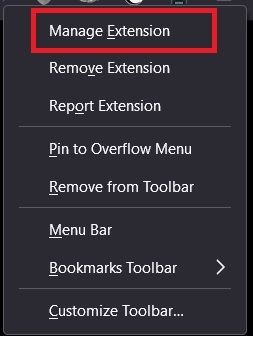
That works on some icons but not all. Right click this Icon and the menu is Pin to overflow menu, Remove from toolbar, Menu bar, Bookmarks toolbar >, Customize toolbar. Image attached. Sorry, the alt key removed the drop window so you got both monitors. Thanx, bob.
Don't know where solved problem came from, I clicked the other choice, not solved.
Not all icons on the toolbar are extensions -
Customize Firefox controls, buttons and toolbars https://support.mozilla.org/en-US/kb/customize-firefox-controls-buttons-and-toolbars
You can view your installed extensions at: 3-bar Menu -> Add-ons and Themes -> Extensions
See also the "Help -> More Troubleshooting Information" (about:support) page.