Windows 10 reached EOS (end of support) on October 14, 2025. If you are on Windows 10, see this article.

Pomoc pśepytaś

Glědajśo se wobšudy pomocy. Njenapominajomy was nigda, telefonowy numer zawołaś, SMS pósłaś abo wósobinske informacije pśeraźiś. Pšosym dajśo suspektnu aktiwitu z pomocu nastajenja „Znjewužywanje k wěsći daś“ k wěsći.

Dalšne informacije
Toś ta nitka jo se archiwěrowała. Pšosym stajśo nowe pšašanje, joli trjebaśo pomoc.
Archiwěrowany

Slow loading

berkell990

Going to ANY website, it takes "forever" to load, but after loading normal speed is experienced. One way to get a website to initially load more quickly is to click the "X" which the spinner is going endlessly, then refresh the page, whereupon it will usually load instantly.

The problem is experienced with any and every website. This problem does not occur with Chrome or Edge:

Windows 11, Firefox 142.0.1 64 bit.

Going to ANY website, it takes "forever" to load, but after loading normal speed is experienced. One way to get a website to initially load more quickly is to click the "X" which the spinner is going endlessly, then refresh the page, whereupon it will usually load instantly. The problem is experienced with any and every website. This problem does not occur with Chrome or Edge: Windows 11, Firefox 142.0.1 64 bit.

Wšykne wótegrona (2)

"...click the "X" WHILE the spinner is going ...

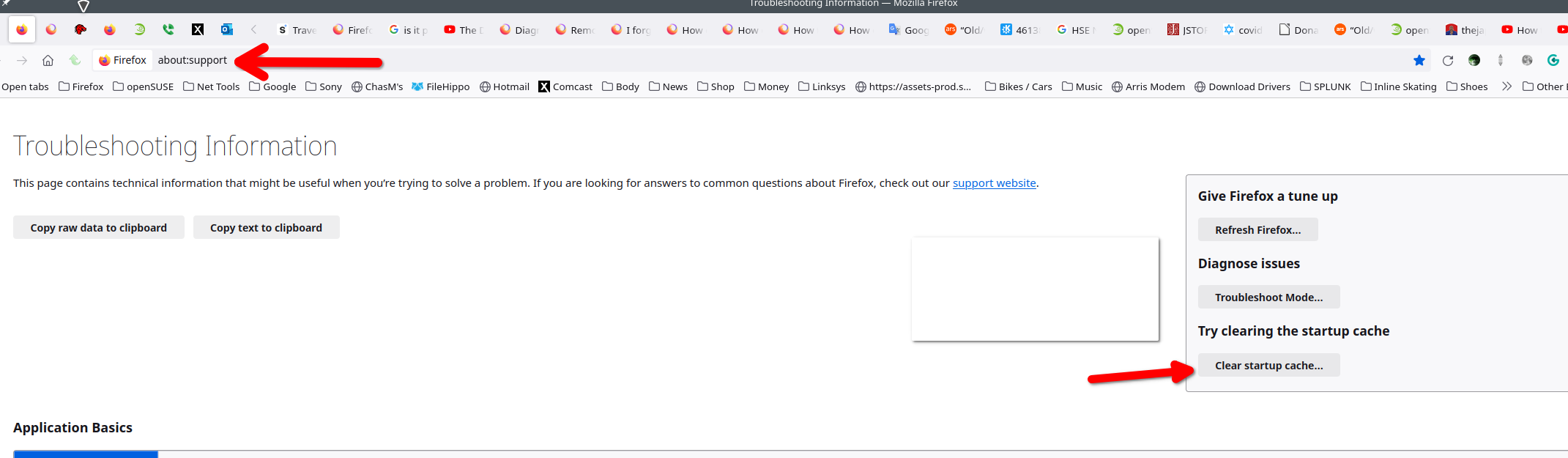
Did you clear the startup cache? see screenshot Did you try with Firefox in Troubleshoot Mode? https://support.mozilla.org/en-US/kb/diagnose-firefox-issues-using-troubleshoot-mode#w_how-to-start-firefox-in-4troubleshoot-modesf5safe-modesf

Did you clear your browser cache? https://support.mozilla.org/en-US/kb/clear-cookies-and-site-data-firefox

What is your dns setup in the computer, browser, and router?