


Allow access to your location not working
Hi everyone,
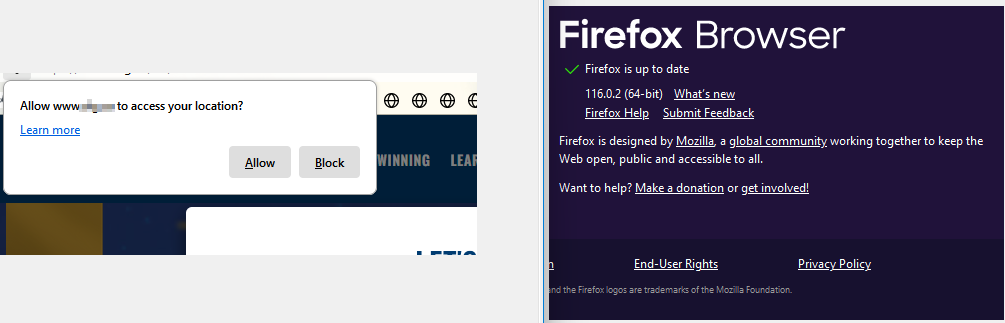
I have permitted a website to access my location, but Firefox is not retaining the settings. While I am on the web site I keep getting the "Allow www to access your location" popup several times in a row and the website still reports that I need to enable the option. This is happening to all websites, not only this specific one.
What I have done thus far:
Restarted Firefox Refreshed Firefox Rebooted my computer Cleared Firefox cache and cookies Confirmed under Settings/Privacy & Security/Location that the site www status is "Allow" Removed my ad block settings from my router as I don't use a local add on
I am using Firefox 116.0.2 (64bit)
Thank you!
Wšykne wótegrona (6)
Uninstall and reinstall Firefox.
Go to about:policies in the address bar and check for active enterprise policies.
Go to about:third-party and disable third-party modules.
Disable any antivirus or web security software.
Hi zeroknight,
Thanks for the reply. Unfortunately, these options didn't help.
I did the following:
Disabled my Endpoint Protection Confirmed my Enterprise Policies service is inactive Disabled all third-party modules Restarted Firefox
I only didn't re-install Firefox, which is under a new profile, after I refreshed it recently. I'll try that if everything else fails since it will take a while for me to reconfigure Firefox the way I like it.
Thanks again.

Because it's happening on several sites, try restarting in troubleshoot mode.
https://support.mozilla.org/en-US/kb/diagnose-firefox-issues-using-troubleshoot-mode https://support.mozilla.org/en-US/kb/troubleshoot-extensions-themes-to-fix-problems (also deals with hardware acceleration) https://support.mozilla.org/en-US/kb/troubleshoot-issues-related-to-add-ons
Hi,
Dropa, this issue is happening in all websites that I would like to allow access to my location, including Google.
Terry, I will try the troubleshooting mode as I soon as I can.
Thanks a lot, guys!
Wót Jay Jr. změnjony
Hi,
I have tried troubleshooting mode, but unfortunately, it didn't work. The pop-up kept coming up one after another, asking me to allow the site to have access to my location.
Thanks for the suggestion!
See this.
Are many sites involved? You could try, while on an affected site, to open the Page Info window and, on the Permissions tab, mark Access your location as Allow.
https://support.mozilla.org/en-US/kb/firefox-page-info-window