


How do I see get to see email formatting icons (hyperlinks, fonts, bullets etc) on updated 1&1 webmail (I can see them on IE)?

I recently updated to the latest version of 1&1 webmail and now cannot see all the formatting icons I need when creating emails such as hyperlinks, fonts, bullets, etc. I can see them when I access my 1&1 email on Internet Explorer. They appear in a line below the subject box and above the email content box. I'm on Windows 8.1 and the latest version of Firefox. How can I access the icons on Firefox?
Wšykne wótegrona (6)
Please update to the most recent version of Firefox:
The latest version is 40.0.3. To make sure its not a graphics issue can you please also try accessing the mail in safe mode? Use Troubleshoot Mode in Firefox
Might also find more help contacting them about the site compatibility: http://help.1and1.com/?hc=website
Missing icons are usually supplied by a font that is downloaded from the server (@font-face) as you might see by little boxes that show the hex code of the characters instead. If you have a font installed that covers this Unicode range then you may see a real (CJK) character and not the little box with the CSS code.
Make sure that you allow pages to choose their own fonts.
- Tools > Options > Content : Fonts & Colors > Advanced: [X] "Allow pages to choose their own fonts, instead of my selections above"
You can check the gfx.downloadable_fonts.enabled pref on the about:config page and make sure that it is set to true (if necessary double-click the line to toggle its value).
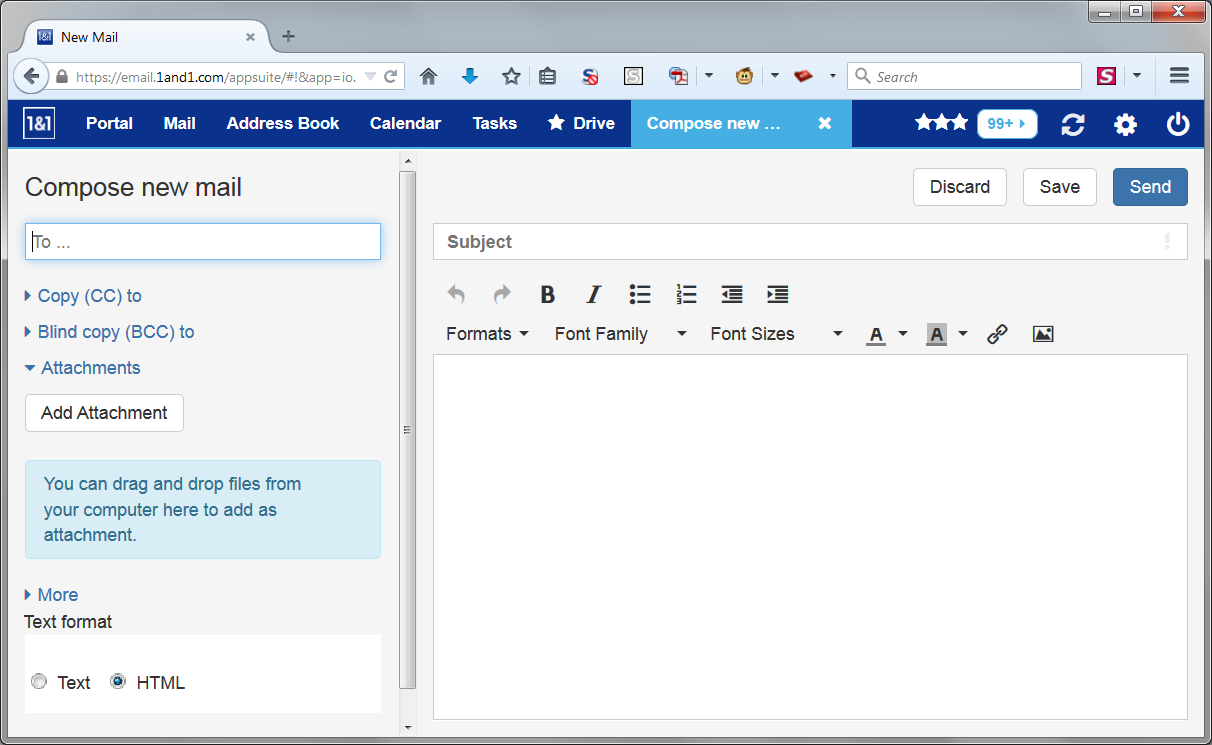
Is the attached what you're looking for? It looks like some of those buttons are characters in the "tinymce.woff" font. Hopefully cor-el's suggestions will make them appear for you.
guigs said
Please update to the most recent version of Firefox: The latest version is 40.0.3. To make sure its not a graphics issue can you please also try accessing the mail in safe mode? Use Troubleshoot Mode in Firefox Might also find more help contacting them about the site compatibility: http://help.1and1.com/?hc=website
Thanks for this. I checked the version of Firefox I'm using and it is 40.0.3. I tried accessing 1and1 webmail in Safemode and the problem still occurs - ie still no icons.
Hi Peter, did cor-el's suggestions in this post help: https://support.mozilla.org/questions/1080179#answer-774387