


Can't Reload access code but Can reload in another Browser

I cannot reload access code though there a button for reloading image, this button does not work in firefox but properley work in other browser, But i need to reload in Firefox
Wšykne wótegrona (5)
Hi Mohajer,
- Go to about:permisssions
- Look for the site that generates the code
- Forget the site
- Restart Firefox
Hi Guigs Thx for your feedback But I could not find about:permisssions how i find this
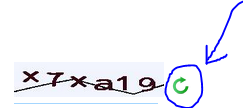
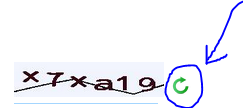
Hi Guigs Thx for your feedback Now I do exactly what you told but still does not work
Start Firefox in Safe Mode to check if one of the extensions (Firefox/Tools > Add-ons > Extensions) or if hardware acceleration is causing the problem.
- Switch to the DEFAULT theme: Firefox/Tools > Add-ons > Appearance
- Do NOT click the Reset button on the Safe Mode start window
- https://support.mozilla.org/kb/Safe+Mode
- https://support.mozilla.org/kb/Troubleshooting+extensions+and+themes
Clear the cache and remove cookies only from websites that cause problems.
"Clear the Cache":
- Firefox > Preferences > Advanced > Network > Cached Web Content: "Clear Now"
"Remove Cookies" from sites causing problems:
- Firefox > Preferences > Privacy > "Use custom settings for history" > Cookies: "Show Cookies"
Please also try the steps provided by corel, however the about:permissions page is found when you put that in the urlbar.