


stop all tabs from loading on startup

I have the "Don't load tabs until selected" selected but all tabs still load. This greatly increases the memory footprint and decreases performance. I have two plugins; Firebug, and Web Development.
I've even tried going into about: configuration and setting some to false where it made sense - no change.
How do I force it NOT to load all tabs on start up - only the active tab?
Thanks.
Alle Antworten (7)
Note that this setting in Options > Tabs only applies to normal tabs.
Pinned tabs are restored by default.
- browser.sessionstore.restore_on_demand (true)
- browser.sessionstore.restore_pinned_tabs_on_demand (false)
- browser.sessionstore.restore_hidden_tabs (tabs in other tab groups)(false)
Start Firefox in Safe Mode to check if one of the extensions (Firefox/Firefox/Tools > Add-ons > Extensions) or if hardware acceleration is causing the problem (switch to the DEFAULT theme: Firefox/Firefox/Tools > Add-ons > Appearance).
- Do NOT click the Reset button on the Safe Mode start window.
I verified all:
- browser.sessionstore.restore_on_demand (true)
- browser.sessionstore.restore_pinned_tabs_on_demand (false)
- browser.sessionstore.restore_hidden_tabs (tabs in other tab groups)(false)
I started in safemode - same thing happens, ALL tabs load. I am not concerned about pinned tabs, I have only one pinned tab.
Any other ideas?
Thanks.
You can check for problems with preferences.
Rename or delete the prefs.js file and possible numbered prefs-##.js files and a possible user.js file to reset all prefs to the default value.
Try to use "Firefox > Exit" (Windows: Firefox/File > Exit; Mac: Firefox > Quit Firefox; Linux: Firefox/File > Quit) to close Firefox if you are currently doing that by clicking the close X on the Firefox title bar.
I have deleted prefs.js and any variant, same with user.js. Restarted in safe mode - still loads all tabs. Unchecked "don't load tabs". Clicked FILE>EXIT. Restarted in safe mode and checked/selected "don't load tabs". FILE>EXIT. restarted - still loads all tabs.
Is the only thing left to do is reset and start over? Any other ideas?
I had this as well. May apply if you use TabMixPlus
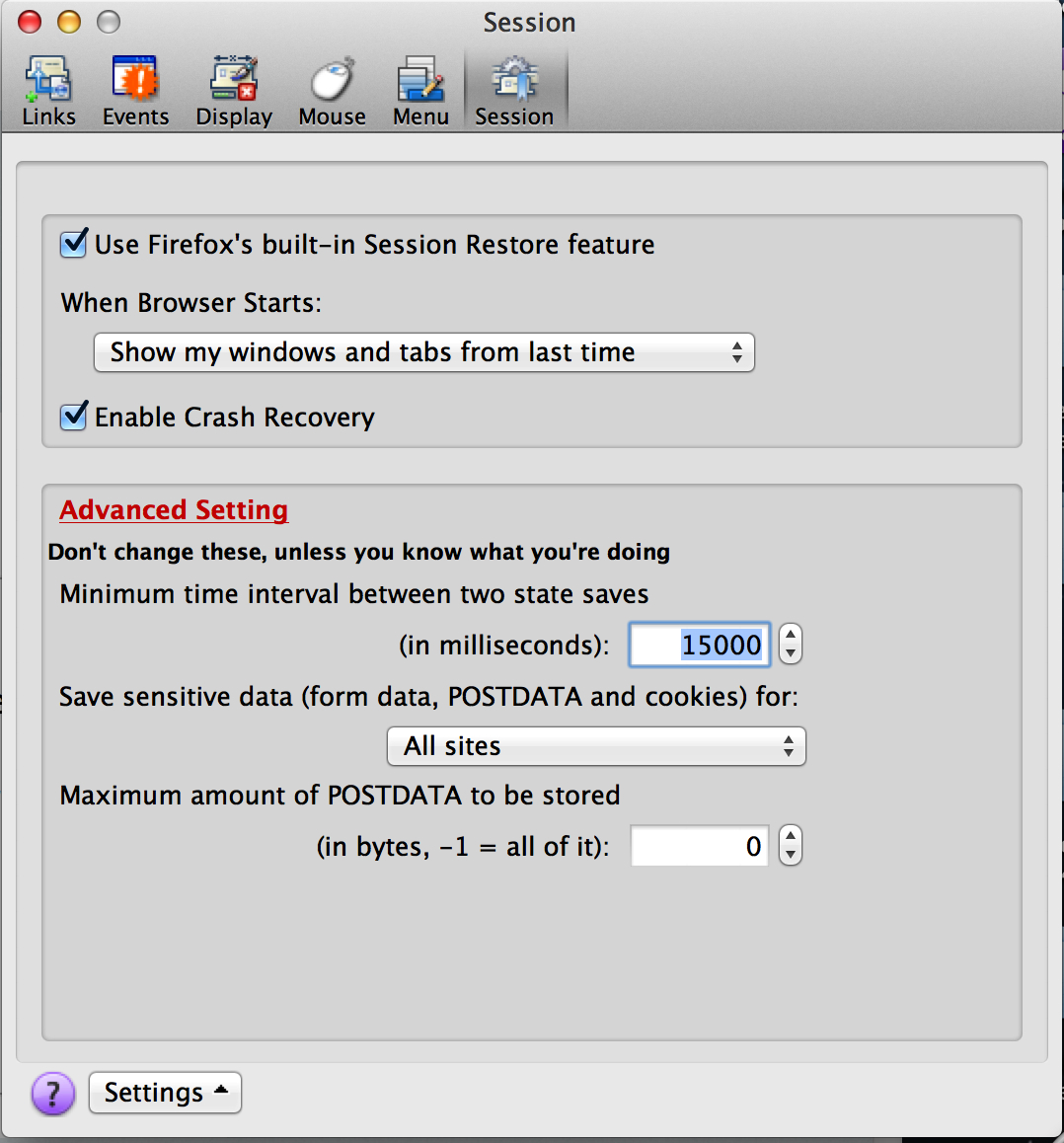
My problem was that I use TabMix Plus, and in FireFox/Tools/TabMix Plus Options/Session, I had unchecked "Use Firefox's Built-In Session Restore Feature". Once I checked this box, to use Firefox Session Restore, the correct operation of refreshing just the 'Top' tab occurs.
In Short; Tick the box:
Use Firefox's Built-In Session Restore Feature in TabMix Plus Options/Session
Bon Chance!
Geändert am von rossaroni
Had the same problem and fixed by removing the prefs.js under
C:\Users\[myname]\AppData\Roaming\Mozilla\Firefox\Profiles\[random].default
this is Win7. shutdown FF first before rename/delete the file or it will created when the current FF is closed.
Geändert am von tony1024
Hi tony1024, since the prefs.js file stores a lot of settings, some of which might be irreplaceable, I think you're right to suggest renaming it (e.g., to prefs.old) instead of just deleting it. Then if an add-on stops working correctly or there are other important data lost, a volunteer could explain how to rescue settings from the old file.