


Profile/session doesn't ever save/load

I run normal firefox on linux. Fully up-to-date. Every time I quit the app, it reverts to a version of my profile from a month ago, and loads all the tabs I had open then, and then receives all the tabs that I sent to the device in the interim (~1 month). As I speak, it just caught the 60 or 70 tabs in this window.
I tried changing the name of my profile folder to randomstring.defaultOLD and changed one of the backups to randomstring.default. This didn't change the behavior. I'm still stuck in the loop. I saved my tabs with onetab, because firefox isn't remembering my session anymore. I thought it was something to do with updates, like it only loses its mind upon updates, but that's not true. It thinks it's updating firefox EVERY TIME, because the one time it's loading to 1 month ago it was updating, but I'm 100% sure there are no updates to firefox in my linux. It's just hallucinating.
The articles on restoring from backup are outdated. They say to use an html file. There is no html file. It's just folders for profiles, not html files. HELP!
Alle Antworten (15)
It sounds like your profile folder isn't writable — can you share more about your operating system, how you installed Firefox or if it came preinstalled, if it's managed by the system, via some packager or store, or you installed it yourself and update it on your own? (Ideally take a screen shot of the "About" window, that will hint at some of these things.)
@jbr
Profile folder definitely is writeable. It's writing a new backup-crashrecovery folder every time I close the browser, and writing to the randomstring.default folder every time as well. It just doesn't "count" for some reason, when I load the profile. Like it's always choosing to load a specific backup-crashrecovery from about a month ago instead of ANY of the more recent ones, or the randomstring.default itself, or if it IS loading randomstring.default, it's not getting the session data.
Ubuntu
It's totally normal firefox, from the normal ubuntu repos, through the terminal. Not a flatpak, not a precompiled binary.
About Firefox
Firefox updates
Updates improve Firefox’s speed, stability, and security.
Firefox is up to date
Version 152.0.4 (64-bit) What’s new
Mozilla Firefox Official Build mozilla-official - 1.0
Where is session data stored within the profile folder? How do I reload a SESSION (without regard to any other components of a profile)? I'll check if the session data is being written.
Well I was under the impression that since 22.04 the system default was snap — but either way the profile paths are different so I don't expect one instance would be trying to write into the others' locations.
The "mozilla-official" bit is interesting as that usually doesn't signal "from the normal ubuntu repos" — more like the *.mozilla.org hosted repo custom added? But no matter the sources and keys, the profiles are in ~/.mozilla/firefox and if brought in with a package manager the paths would be owned correctly under normal circumstances.
So if you e.g. switch a theme, or change a trivial setting, that sticks — but not sessionrestore? History, passwords, that kind of data persists, just not the tabs?
Generally after messing with profiles, I'd recommend adding a fresh new profile to test, trying that one out to verify the data sticks between restarts, and then look into moving over the things to that.
If neither the trivial changes or new profile data are kept between restarts, the issue is elsewhere yet.
Snaps are terrible. Every time there's an update to firefox, the whole system is at risk of freezing. So I went normal style, don't think I had to add Mozilla repo, but maybe.
Since changing my randomstring.default to randomstring.defaultOLD and back again (was testing a crashbackup default folder), it remembers session now. So I've logged in to all my accounts again, huge pain, but hopefully it's cured. So flukey.
Been unable to session restore for over a month.
FWIW I wouldn't expect ID.default to be the "right" profile unless super–godfathered legacy (see support.mozilla.org/questions/1264072) as that's kind of an empty fallback, normally your daily driver for release channel would be ID.default-release 🤷
(Hence why I'm suggesting creating a new one, that hasn't been shoved around, and watching that one for data stability.)
Ok, that'd be crazy, because otherwise why would renaming ID.default to ID.defaultOLD and then renaming it back fix the no-saving problem?! There's no "ID.default-release in my .mozilla/firefox folder.
I couldn't make much sense of the question you linked to.
@jbr Now it's broken again. I don't understand what the problem is. Where does firefox store session files? I need to be able to take my session out of the old profile or backups and take it to a new profile, I guess.
@jbr, also, sadly, it's not writing to sessionstore-backups>recovery.jsonlz4. Or rather, it's writing the 2 month old session to there every time since 2 months ago. Is there any file it should be writing the current session to?
Backups usually write the penultimate sessionstore — so if you're not getting the correct "fresh" one, the outdated one is probably also getting backed up over and over in the same stale state:(
You've got the paths right, it's described here: How to restore a browsing session from backup — you basically just lift these files and folders into your new profile.
Can I save a session manually? I hate having to re-log in to all my services every time I restart the browser. If I could manually save, I can get past this bug.
And which file is the current session? I want to look at it, not the backup session.
@jbr Plot thickens. It's auto-updating, without me installing/updating firefox from terminal, as usual. Every time it reverts to the old session, it's after an update. What can I do about this? Why would installing any update, no matter how small, discard the current session every time?
recovery.* is current +its backup, previous.* is the –1 in case something goes awry, there are also others on the side for upgrade* e.g.:
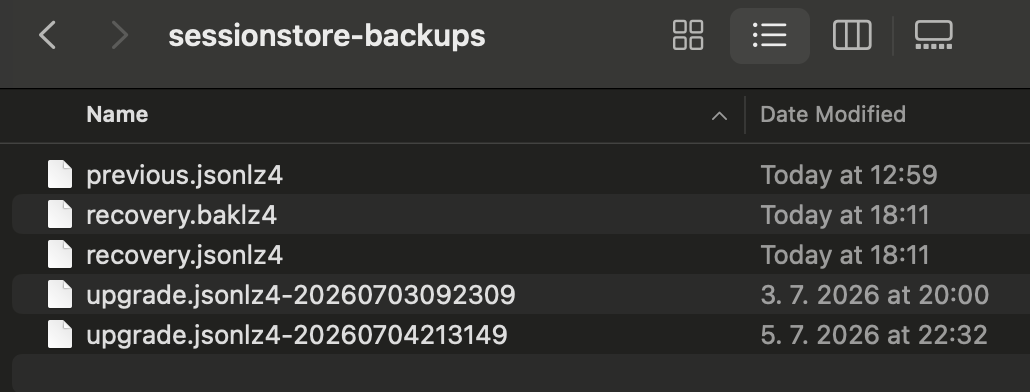
Also look at the sibling logs folder that will have any errors for missing files, unexpected locations or access bits etc.
You might be able to write the session, but you'd have to learn the JS object from source and then figure out how to execute the internals via the browser console. Definitely possible, but might have rather steep learning curve if you're not well versed in the sessionstore code.
Any idea how it's updating? It used to be from sudo apt update only, so I'd know when an update was lurking.
Any idea why the update is causing this inability to save the current session? It's writing the same recovery.jsonlz4 from last month every time it seems.
Where is the sibling logs folder?
My temporary attempt at solution is to make a new profile and re-log into everything one more time. Hopefully whatever juju went wrong in the default profile doesn't follow me over.