


I cannot receive nor send emails from my windows 11 desktop computer

Hi, Since approx. 1 month, I cannot receive nor send emails from my Windows 11 desktop computer. My ISP is Videotron and they tell me that from their end, everything is fine and the configuration is fine. If I use the Videotron Web Service, I can send and receive emails using the Videotron Web Services but these are not reflected on my Thunderbird email interface. If I try to send an email from Thinderbird, I get this message # # * * Sending of the message failed.
- # * * An error occurred while sending mail: Outgoing server (SMTP) error. The server responded: smtp.videotron.ca Videotron ZGdcwFfPIz2we service temporarily unavailable AUP#EML-016.'
On my Android smartphone, Thunderbird is installed and it works perfectly...I can send and receive emails.
What can be done to make sure that I can send and receive emails from my computer, and to keep the smartphone and computer synchronized. Thank you
Ausgewählte Lösung
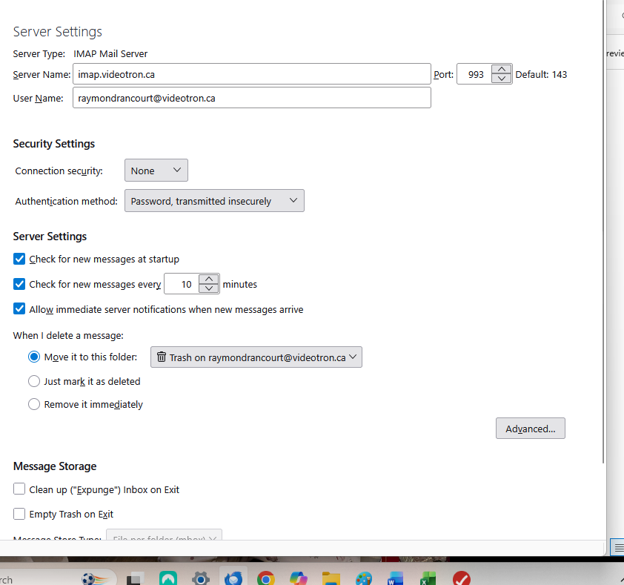
In image for incoming Server Type: IMAP Mail Server Server Name, Port and User Name are correct. BUT...Image shows you do not have the correct security settings for the incoming server. Under Security Settings - image shows
- Connection security says 'None'
- Authentication method says Password transmitted insecurely
Those settings will fail to get connection.
You need the following:
- Incoming server: imap.videotron.ca
- Port : 993
- Connection Security: SSL/TLS
- User name: full email address
- Authentication Method: Normal Password
Password: same one you use to access webmail account Update those security settings, then restart Thunderbird.
Outgoing SMTP looks correct. It's probably failing because of too many insecure attempts by incoming server.
It;s likely you are having a problem moving mail because every time you move anything there is a constant communication with the server to update server. If you have an Anti-virus it will also be interrupting the process as it scans any file that gets opened. Server will not accept anything that's not secure.
Alle Antworten (3)
You cannot compare sending emails via webmail because it's not using the same protocols. One is direct from the server the other needs to access the server in order to use its imap and smtp server settings.
The error message is from the server not Thunderbird.
Error message of that type tend to be created because and not limited to:
- an authentication issue
- a block due to a server Spam filter failure
- VPN enabled
First check your computer to see if a VPN has been enabled. Many Anti-Virus products now include a VPN and in some cases the AV can auto enable it. Switch VPN off. The VPN will hide your IP address, so server may think you are not you and block all attempts to access server.
Check the authentication method being used.
It would be helpful to know what server settings are being used. Please upload images that show:
- Account settings > 'Server Settings' for the account
- Account Settings > 'Outgoing Server(SMTP)' (located at bottom of left pane) - then select the smtp being used.
I presume you are using Imap so server settings to use: IMAP
- Incoming server: imap.videotron.ca
- Port : 993
- Connection Security: SSL/TLS
- User name: full email address
- Authentication Method: Normal Password
- Password: same one you use to access webmail account
SMTP:
- Outgoing server: smtp.videotron.ca
- Port : 465
- Connection Security: SSL/TLS
- User name: full email address
- Authentication Method: Normal Password
- Password: same one you use to access webmail account
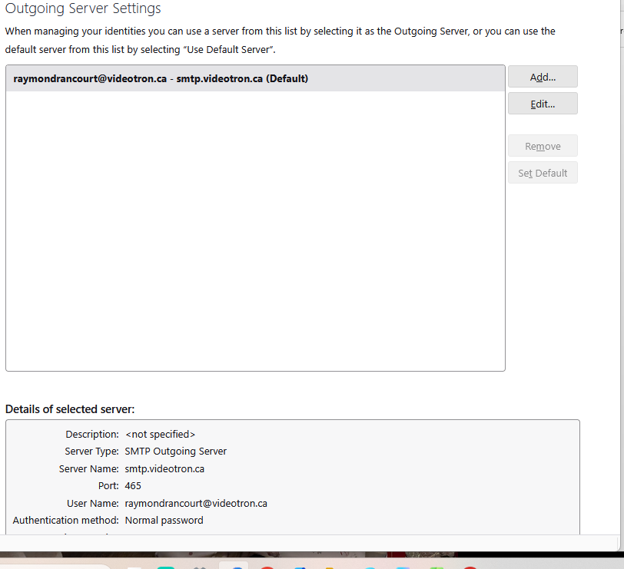
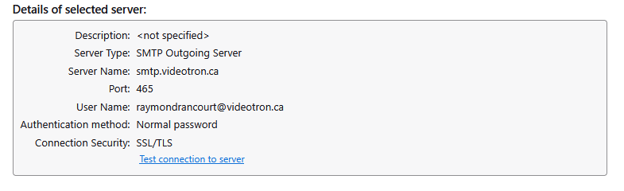
As requested, you will find attached screen prints of the different server configurations.
Note that on the " Details of Selected Server", there is a note to "Test connection to server", and the connection test results were positive.
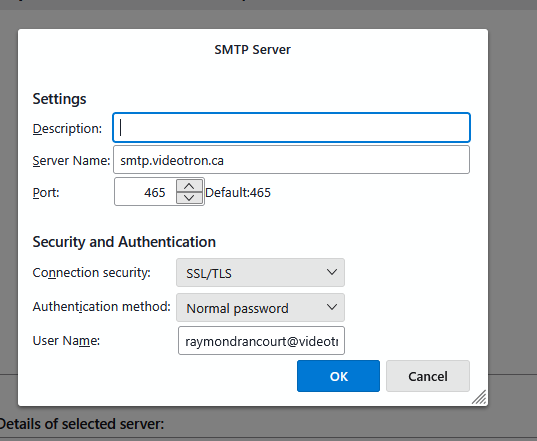
Another thing. On the STMP server dialogue box, the
  Authentication Method: Normal Password
  Password: same one you use to access webmail account
entries are not shown.
It is now getting extremely hard to work without Thunderbird connecting to my ISP. I can't even transfer emails from one folder to another. Thunderbird is totally frozen.
I also keep getting this message... Mozilla Thunderbird...Connection to server imap.videotron.ca has timed out
Please provide me with a solution ASAP. Thanks
Ausgewählte Lösung
In image for incoming Server Type: IMAP Mail Server Server Name, Port and User Name are correct. BUT...Image shows you do not have the correct security settings for the incoming server. Under Security Settings - image shows
- Connection security says 'None'
- Authentication method says Password transmitted insecurely
Those settings will fail to get connection.
You need the following:
- Incoming server: imap.videotron.ca
- Port : 993
- Connection Security: SSL/TLS
- User name: full email address
- Authentication Method: Normal Password
Password: same one you use to access webmail account Update those security settings, then restart Thunderbird.
Outgoing SMTP looks correct. It's probably failing because of too many insecure attempts by incoming server.
It;s likely you are having a problem moving mail because every time you move anything there is a constant communication with the server to update server. If you have an Anti-virus it will also be interrupting the process as it scans any file that gets opened. Server will not accept anything that's not secure.