


Ctrl + Shift + V keeps bringing up a pop up

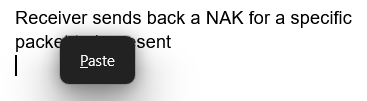
When copying and pasting from one application to another, by using Ctrl + Shift + V to paste without format to Google Docs, I keep getting a "Paste" pop up that I've never gotten until now. It keeps getting in the way and I don't see a way to remove it.
It's making copying and pasting very difficult and is driving me up the wall.
Alle Antworten (2)

I'm having this issue too, would love to figure it out as it's majorly getting in the way of my workflow.
I tried Chrome mask on my google sheets and it didn't fix the problem. I also disabled all of my extensions and that didn't fix it either, so it's not an interaction with those.
I also get this pop-up while writing emails in Outlook on the web, with either ctrl+shift+v or just ctrl+v. However, in Outlook it also pastes the text, I just can't continue typing until I use my mouse to click out of the dialogue box.
Both ways have been extremely annoying and you're the first person I've been able to find talking about it!