


Credit Card Payment Methods missing from settings

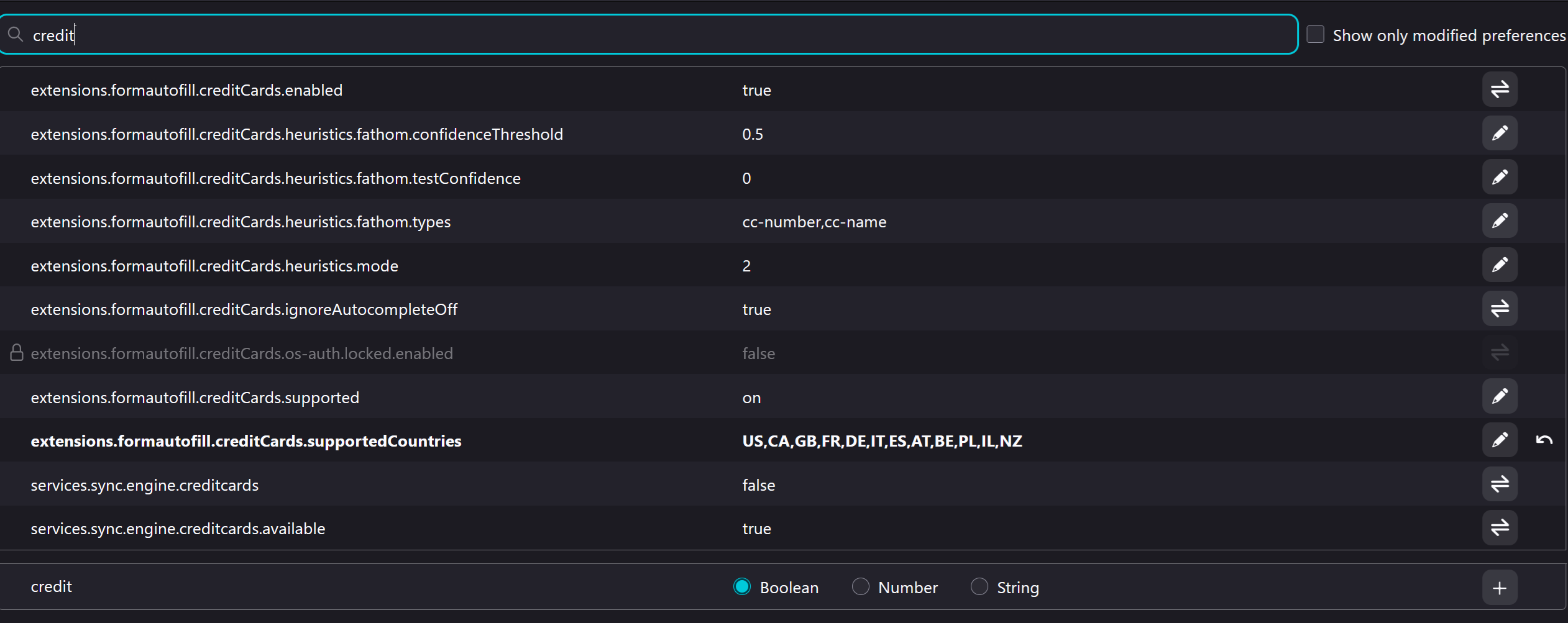
My credit card payment methods are missing from Firefox's settings. I tried enabling every relevant setting in about:config and still they won't appear. My current relevant settings are shown in the attached screenshot. any suggestions?
Ausgewählte Lösung
I was able to fix this by adding my country code to the list in about:config to BOTH of these lines: extensions.formautofill.creditCards.supportedCountries extensions.formautofill.addresses.supportedCountries Then I restarted Firefox.
Alle Antworten (5)
Hi
Can you check this too?
extensions.formautofill.available "on"
It was on "detect". I wrote "on" instead, and still won't show the payment setting.
Ausgewählte Lösung
I was able to fix this by adding my country code to the list in about:config to BOTH of these lines: extensions.formautofill.creditCards.supportedCountries extensions.formautofill.addresses.supportedCountries Then I restarted Firefox.
DJ_SANYEE said
I was able to fix this by adding my country code to the list in about:config to BOTH of these lines: extensions.formautofill.creditCards.supportedCountries extensions.formautofill.addresses.supportedCountries Then I restarted Firefox.
This solved the issue. Thanks!

I tried all of the suggested fixes (v146) and none worked, then I tried setting:
extensions.formautofill.addresses.supported
to ON, instead of the default setting of DETECT and "Payment methods" reappeared below "Manage passkeys"
I hope this helps someone!