


Windows 10 reached EOS (end of support) on October 14, 2025. If you are on Windows 10, see this article.

Hilfe durchsuchen

Vorsicht vor Support-Betrug: Wir fordern Sie niemals auf, eine Telefonnummer anzurufen, eine SMS an eine Telefonnummer zu senden oder persönliche Daten preiszugeben. Bitte melden Sie verdächtige Aktivitäten über die Funktion „Missbrauch melden“.

Weitere Informationen

Bookmarks are driving me crazy

See the attached image: I have sub-folders Bookmarks Toolbar, Bookmarks Menu, and Other Bookmarks all within a folder called All Bookmarks. The first two are empty, every single one of my bookmarks is in the Other Bookmarks sub-folder. I can't delete any of these folders. On which planet does this make sense?

The "All Bookmarks" super-folder should have all the folders in the Other Bookmarks sub-folder and it's three current children should all be send to an orphanage.

Any way to accomplish this? Obviously the folder names are unimportant (At least to me).

Thanks for any efforts!
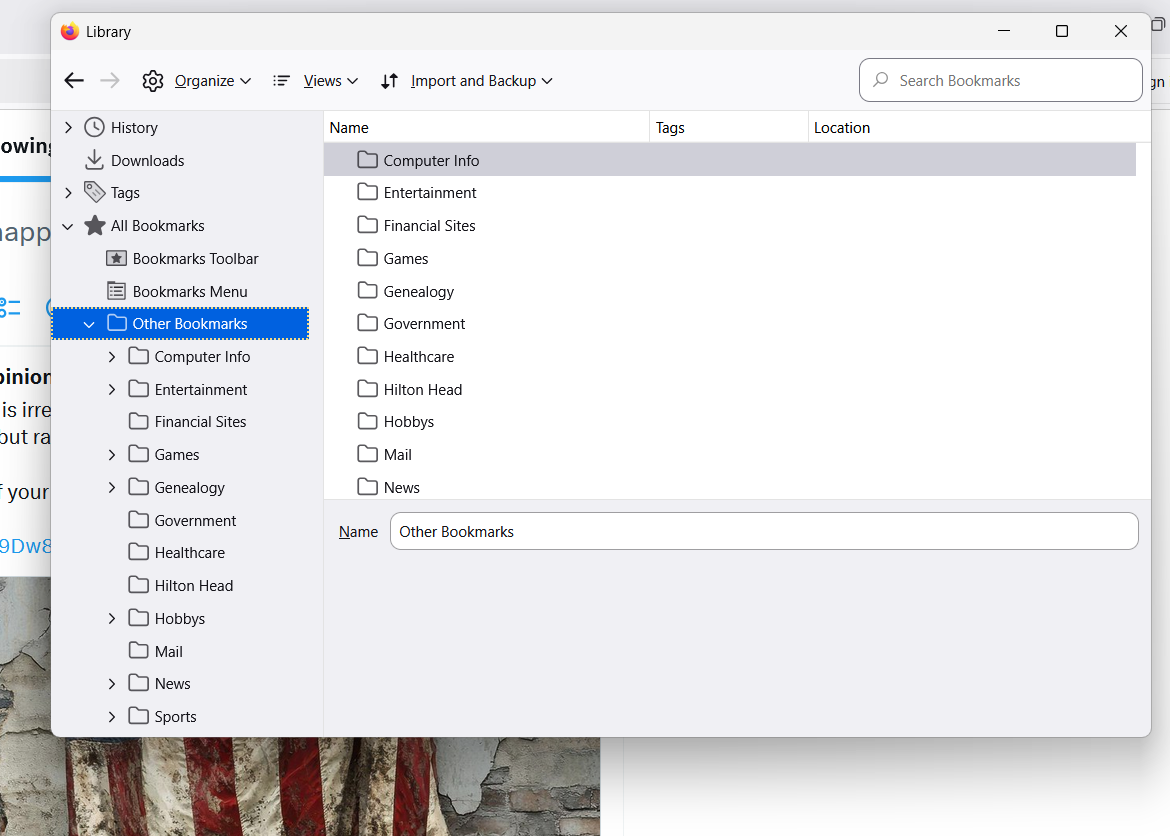
See the attached image: I have sub-folders Bookmarks Toolbar, Bookmarks Menu, and Other Bookmarks all within a folder called All Bookmarks. The first two are empty, every single one of my bookmarks is in the Other Bookmarks sub-folder. I can't delete any of these folders. On which planet does this make sense? The "All Bookmarks" super-folder should have all the folders in the Other Bookmarks sub-folder and it's three current children should all be send to an orphanage. Any way to accomplish this? Obviously the folder names are unimportant (At least to me). Thanks for any efforts!
Angefügte Screenshots

Alle Antworten (1)

Bookmarks Menu, Bookmarks Toolbar, and Other Bookmarks are the three root containers. I understand that you don't care to use Bookmarks Menu or Bookmarks Toolbar, but none of the three root containers can be deleted.

Are you sure that Other Bookmarks is the most convenient place to access your bookmarks? It seems like an extra step compared with the Toolbar or Menu.

Stellen Sie eine Frage

Sie müssen sich mit Ihrem Benutzerkonto anmelden, um auf Beiträge zu antworten. Bitte stellen Sie eine neue Frage, wenn Sie noch kein Benutzerkonto haben.